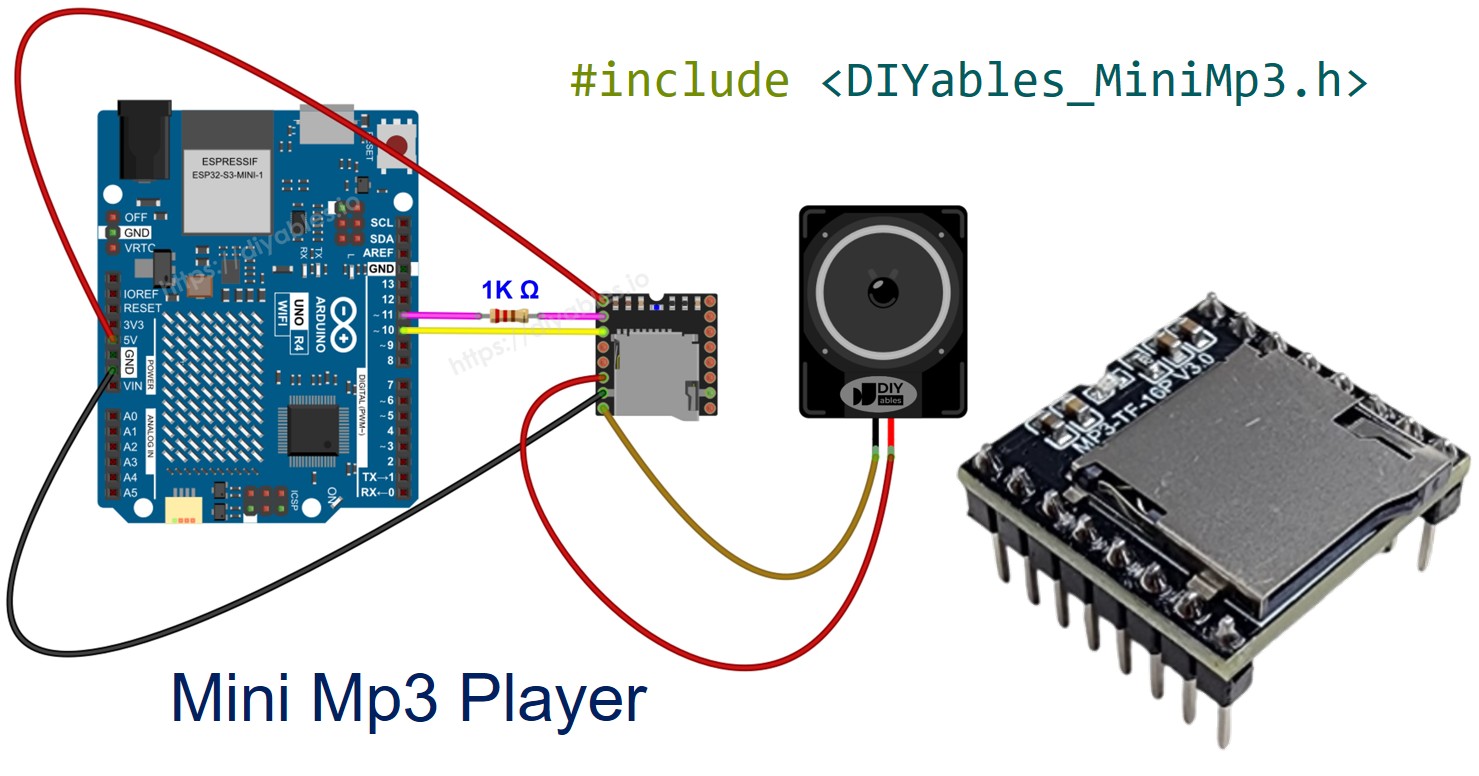
아두이노 우노 R4 미니 Mp3 플레이어

이 튜토리얼에서는 Arduino Uno R4(WiFi 및 Minima 변형 모두)와 함께 DIYables 미니 Mp3 플레이어 모듈을 사용하는 방법을 배웁니다. 다음 내용을 다룹니다:

아두이노 우노 R4 미니 mp3 플레이어

필요한 하드웨어

1×Arduino UNO R4 WiFi or Arduino UNO R4 Minima
1×(또는) DIYables STEM V4 IoT, Compatible with Arduino Uno R4 WiFi 쿠팡 | 아마존
1×USB 케이블 타입-A to 타입-C (USB-A PC용) 쿠팡 | 아마존
1×USB 케이블 타입-C to 타입-C (USB-C PC용) 아마존
1×DIYables Mini Mp3 Player module 아마존
1×마이크로 SD 카드 아마존
1×Speaker 아마존
1×브레드보드 쿠팡 | 아마존
1×점퍼케이블 쿠팡 | 아마존
1×(추천) 아두이노 우노 R4용 스크루 터미널 블록 쉴드 쿠팡 | 아마존
1×(추천) Sensors/Servo Expansion Shield for Arduino UNO R4 아마존
1×(추천) 아두이노 우노 R4용 브레드보드 쉴드 쿠팡 | 아마존
1×(추천) 아두이노 우노 R4용 케이스 쿠팡 | 아마존
1×(추천) 아두이노 우노 R4용 전원 분배기 쿠팡 | 아마존
1×(추천) 아두이노 우노용 프로토타이핑 베이스 플레이트 & 브레드보드 키트 아마존
공개: 이 포스팅 에 제공된 일부 링크는 아마존 제휴 링크입니다. 이 포스팅은 쿠팡 파트너스 활동의 일환으로, 이에 따른 일정액의 수수료를 제공받습니다.
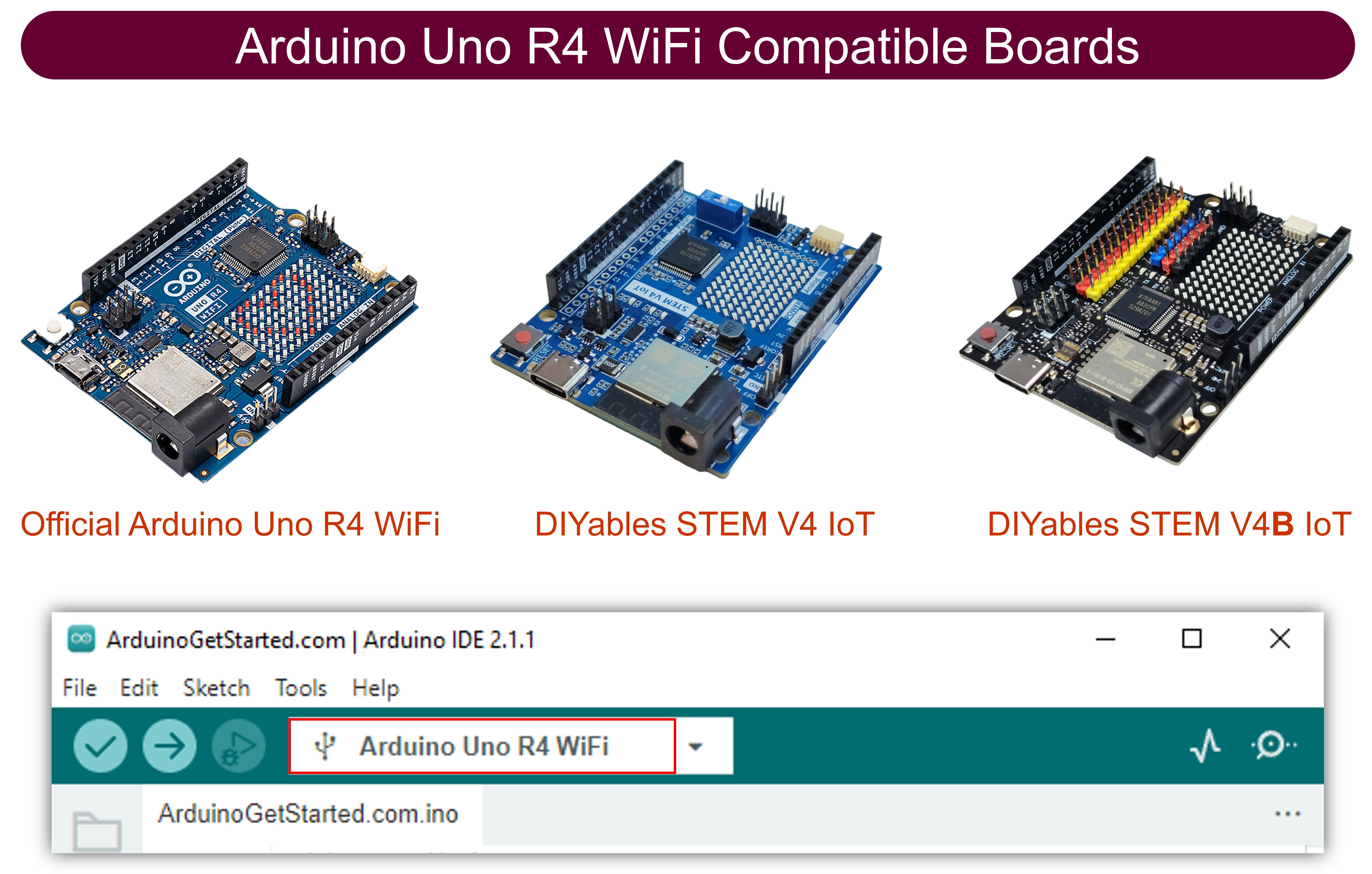
Arduino Uno R4 WiFi Compatible Boards

미니 Mp3 플레이어 모듈에 대하여

DIYables 미니 Mp3 플레이어는 YX5200-24SS 칩을 기반으로 한 소형 mp3 디코더 모듈입니다. 마이크로 SD 카드에서 직접 mp3 파일을 재생하고 내장 앰프를 통해 스피커(최대 3W)를 구동하거나 외부 앰프와 함께 사용하기 위해 DAC 핀을 통해 라인 레벨 오디오를 출력할 수 있습니다.

통신은 9600 보드레이트의 UART를 통해 이루어지므로 모든 Arduino 보드에서 제어하기 쉽습니다. 주요 기능은 다음과 같습니다:

  • 재생, 일시 정지, 재개, 중지
  • 0~30까지 볼륨 조절
  • 6가지 이퀄라이저 프리셋: 일반, 팝, 록, 재즈, 클래식, 베이스
  • 트랙 반복, 폴더 반복, 전체 셔플
  • 번호가 매겨진 디렉토리로 폴더 기반 재생
  • 광고로 재생 중단
  • 현재 트랙, 볼륨, 재생 상태 등 쿼리

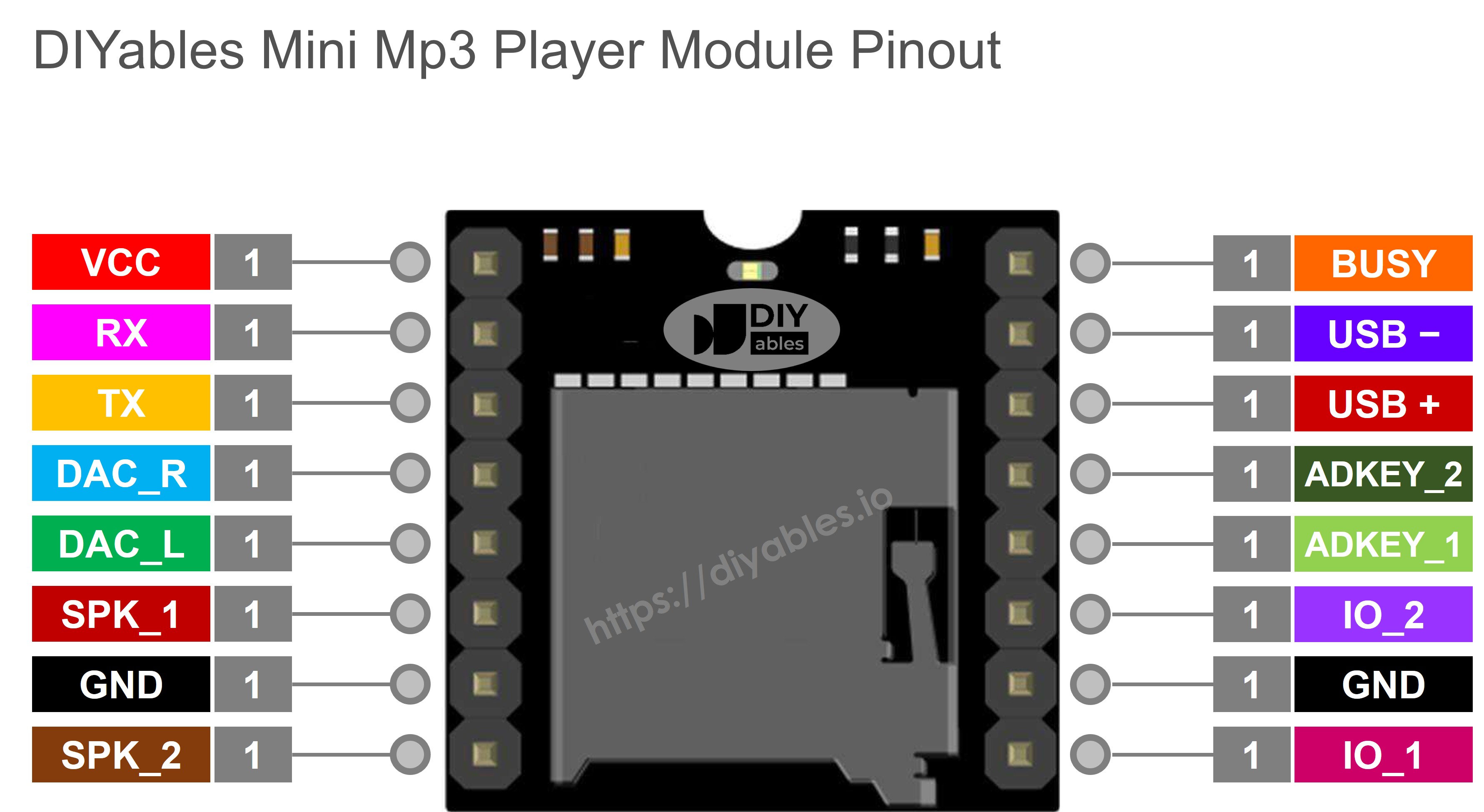
모듈 핀아웃

설명
VCC 전원 입력(3.2V~5.0V)
GND 접지
RX 시리얼 데이터 입력 — 1K 저항을 통해 Arduino TX에 연결
TX 시리얼 데이터 출력 — Arduino RX에 연결
SPK_1 스피커 양극 단자(직접 구동, 최대 3W)
SPK_2 스피커 음극 단자(직접 구동, 최대 3W)
DAC_R 오른쪽 채널 라인 출력(외부 앰프용)
DAC_L 왼쪽 채널 라인 출력(외부 앰프용)
BUSY 재생 중 LOW, 유휴 상태 시 HIGH
IO_1 짧게 누르기 = 이전 트랙, 길게 누르기 = 볼륨 낮추기
IO_2 짧게 누르기 = 다음 트랙, 길게 누르기 = 볼륨 높이기
미니 mp3 플레이어 핀아웃

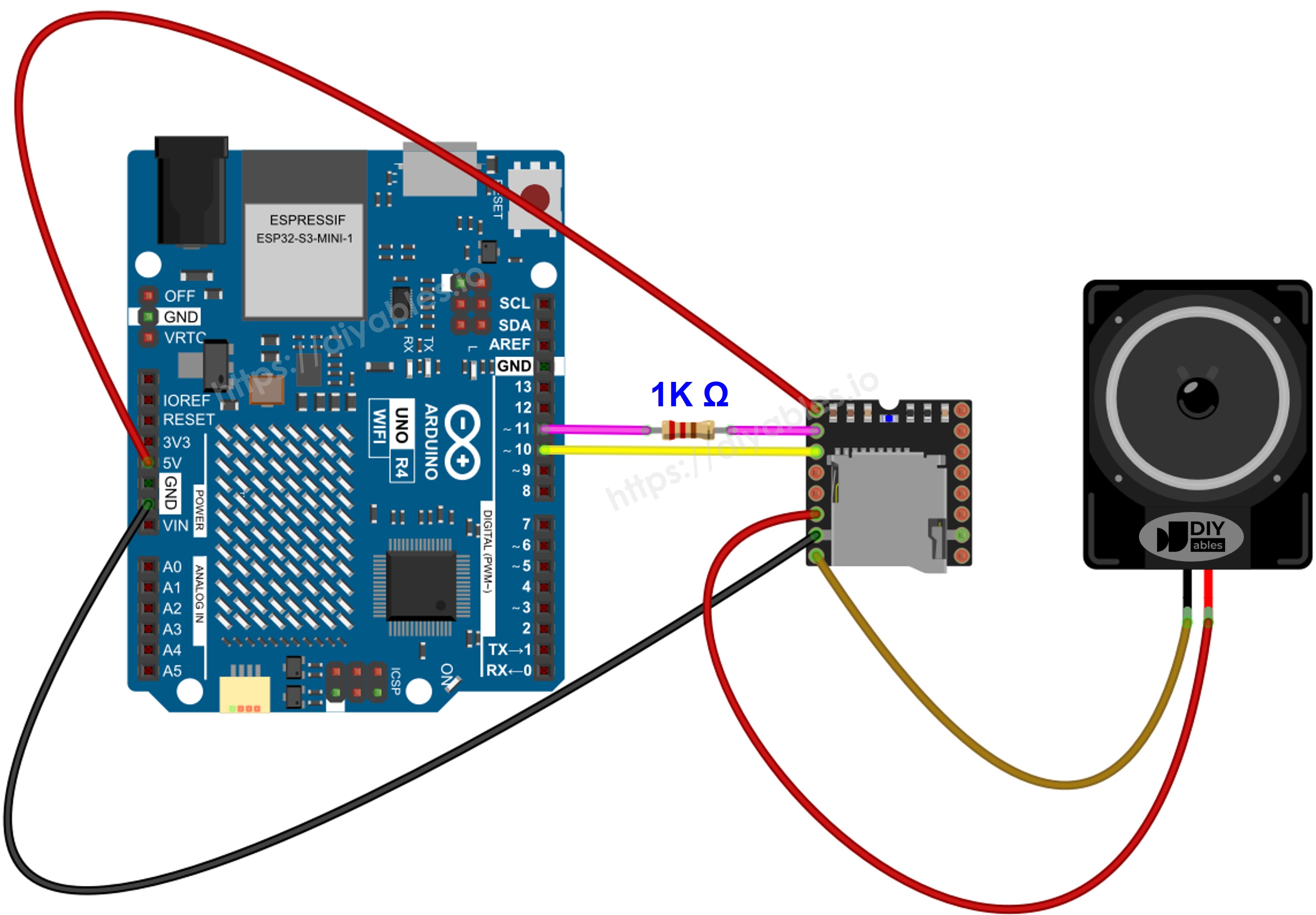
배선도

Arduino Uno R4는 5V 로직으로 동작하므로 모듈의 3.3V 입력을 보호하기 위해 모듈의 RX 라인에 1K 저항이 필요합니다.

미니 Mp3 플레이어 핀 Arduino Uno R4 핀 참고
VCC 5V
GND GND
RX 핀 11 1K 저항을 통해(5V 보드에 필요)
TX 핀 10
SPK_1 스피커 +
SPK_2 스피커 −
아두이노 우노 R4 미니 mp3 플레이어 배선도

이 이미지는 Fritzing을 사용하여 만들어졌습니다. 이미지를 확대하려면 클릭하세요.

Arduino Uno R4와 기타 부품에 전원을 공급하는 가장 효과적인 방법을 확인하시려면, 아래 링크를 참조하세요: 아두이노 우노 R4 전원 공급 방법.

팁: Uno R4에는 하드웨어 시리얼 포트(핀 0과 1의 Serial1)가 있지만, 핀 0/1은 USB와 공유되므로 핀 10/11에서 SoftwareSerial을 사용하는 것이 더 안전한 방법입니다.

SD 카드 준비

  1. 마이크로 SD 카드를 FAT16 또는 FAT32로 포맷합니다.
  2. Mp3 파일을 0으로 채워진 이름을 사용하여 루트 디렉토리에 복사합니다:
/001.mp3 /002.mp3 /003.mp3
  1. 폴더 기반 재생의 경우, 번호가 매겨진 폴더에 번호가 매겨진 파일을 만듭니다:
/01/001.mp3 /01/002.mp3 /02/001.mp3

주요 사항:

  • 트랙 번호는 0이 아닌 1부터 시작합니다.
  • 모듈은 파일 이름이 아닌 파일이 복사된 순서에 따라 트랙 순서를 결정합니다. 항상 먼저 카드를 포맷한 다음 원하는 순서대로 한 번에 하나씩 파일을 복사하세요.
  • 폴더 이름: 2자리, 0으로 채워짐(01~99).
  • 폴더 내 파일 이름: 3자리, 0으로 채워짐(001~255).

라이브러리 설치

  • USB-C 케이블을 사용하여 Arduino Uno R4를 컴퓨터에 연결합니다.
  • Arduino IDE를 열고 올바른 보드와 포트를 선택합니다.
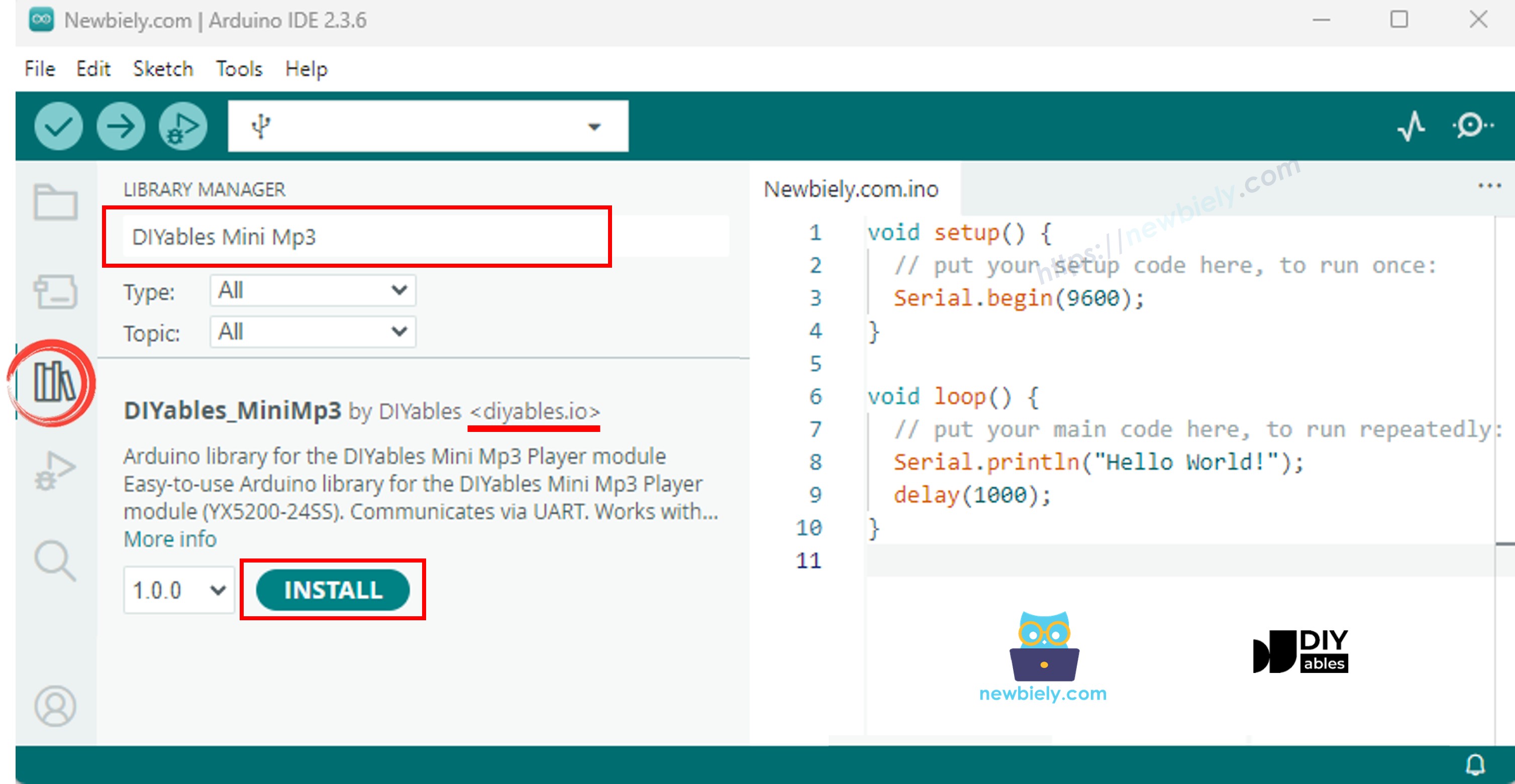
  • 왼쪽 사이드바에서 Libraries 아이콘을 클릭합니다.
  • 검색 상자에 "DIYables_MiniMp3"를 입력하고 DIYables의 라이브러리를 찾습니다.
  • Install을 클릭하여 라이브러리의 최신 버전을 추가합니다.
아두이노 우노 R4 미니 mp3 플레이어 라이브러리

이 라이브러리에는 외부 종속성이 없습니다.

Arduino Uno R4 코드 - 단일 트랙 재생

아래 스케치는 SD 카드에서 하나의 mp3 트랙을 재생합니다.

/* * DIYables Mini Mp3 Player - Play One Track * * Product: DIYables Mini Mp3 Player Module * https://diyables.io/products/mini-mp3-player-module * * Tested with: * - Arduino Uno R3 * - Arduino Uno R4 WiFi / R4 Minima * - Arduino Mega * - Arduino Due * - Arduino Giga * - DIYables STEM V3 https://diyables.io/stem-v3 * - DIYables STEM V4 IoT https://diyables.io/stem-v4-iot * - DIYables STEM V4B IoT https://diyables.io/stem-v4b-iot * - DIYables STEM V4 Edu https://diyables.io/stem-v4-edu * - DIYables MEGA2560 R3 https://diyables.io/atmega2560-board * - DIYables Nano R3 https://diyables.io/nano-board * - DIYables ESP32 Board https://diyables.io/esp32-board * - DIYables ESP32 S3 (Uno) https://diyables.io/esp32-s3-uno * - Expected to work with other Arduino-compatible boards * * Plays track 001 once, then stops. * * Wiring (Arduino Uno R4): * Mini Mp3 RX -> Arduino Pin 11 (via 1K resistor) * Mini Mp3 TX -> Arduino Pin 10 * Mini Mp3 VCC -> 5V * Mini Mp3 GND -> GND * Speaker connected to SPK_1 and SPK_2 pins * * SD Card: Put mp3 files in root, named 001.mp3, 002.mp3, etc. */ #include <DIYables_MiniMp3.h> #include <SoftwareSerial.h> SoftwareSerial mp3Serial(10, 11); // RX, TX DIYables_MiniMp3 mp3; void setup() { Serial.begin(9600); mp3Serial.begin(9600); mp3.begin(mp3Serial); delay(1000); // Wait for the module to initialize mp3.setVolume(25); // Set volume (0 to 30) Serial.println("Playing track 1..."); mp3.play(1); // Play track 001.mp3 } void loop() { // Nothing to do here }

실행 방법

  • Mp3 파일(001.mp3, 002.mp3 등)이 있는 SD 카드를 준비하고 모듈에 삽입합니다.
  • 배선도에 따라 미니 Mp3 플레이어를 Uno R4에 연결합니다.
  • USB-C 케이블로 Uno R4를 컴퓨터에 연결합니다.
  • Arduino IDE를 열고 Arduino Uno R4 WiFi(또는 Minima)를 보드로 선택하고 올바른 포트를 선택합니다.
  • 위의 코드를 IDE 편집기에 붙여 넣습니다.
  • Upload를 누릅니다.

스피커에서 track 001.mp3 소리가 들려야 합니다.

재생 함수 빠른 참조

함수 역할 사용 예
play(trackNum) 특정 트랙을 시작합니다 mp3.play(1)
playNext() 다음 트랙으로 건너뜁니다 mp3.playNext()
playPrevious() 이전 트랙으로 돌아갑니다 mp3.playPrevious()
pause() 현재 트랙을 일시 정지합니다 mp3.pause()
resume() 일시 정지된 트랙을 재개합니다 mp3.resume()
stop() 재생을 완전히 중지합니다 mp3.stop()

Arduino Uno R4 코드 - 여러 트랙 순차 재생

이 스케치는 각 트랙 사이에 구성 가능한 지연을 두고 여러 트랙을 순서대로 재생합니다.

/* * DIYables Mini Mp3 Player - Play Multiple Tracks * * Product: DIYables Mini Mp3 Player Module * https://diyables.io/products/mini-mp3-player-module * * Tested with: * - Arduino Uno R3 * - Arduino Uno R4 WiFi / R4 Minima * - Arduino Mega * - Arduino Due * - Arduino Giga * - DIYables STEM V3 https://diyables.io/stem-v3 * - DIYables STEM V4 IoT https://diyables.io/stem-v4-iot * - DIYables STEM V4B IoT https://diyables.io/stem-v4b-iot * - DIYables STEM V4 Edu https://diyables.io/stem-v4-edu * - DIYables MEGA2560 R3 https://diyables.io/atmega2560-board * - DIYables Nano R3 https://diyables.io/nano-board * - DIYables ESP32 Board https://diyables.io/esp32-board * - DIYables ESP32 S3 (Uno) https://diyables.io/esp32-s3-uno * - Expected to work with other Arduino-compatible boards * * Plays tracks one after another with a delay between them. * * Wiring (Arduino Uno R4): * Mini Mp3 RX -> Arduino Pin 11 (via 1K resistor) * Mini Mp3 TX -> Arduino Pin 10 * Mini Mp3 VCC -> 5V * Mini Mp3 GND -> GND * Speaker connected to SPK_1 and SPK_2 pins * * SD Card: Put mp3 files in root, named 001.mp3, 002.mp3, 003.mp3 */ #include <DIYables_MiniMp3.h> #include <SoftwareSerial.h> SoftwareSerial mp3Serial(10, 11); // RX, TX DIYables_MiniMp3 mp3; int currentTrack = 1; int totalTracks = 3; // Change this to match your SD card unsigned long lastTrackTime = 0; unsigned long trackDuration = 5000; // Wait 5 seconds between tracks (adjust as needed) void setup() { Serial.begin(9600); mp3Serial.begin(9600); mp3.begin(mp3Serial); delay(1000); mp3.setVolume(20); Serial.println("Playing track 1..."); mp3.play(currentTrack); lastTrackTime = millis(); } void loop() { // After trackDuration, play the next track if (millis() - lastTrackTime >= trackDuration) { currentTrack++; if (currentTrack > totalTracks) currentTrack = 1; // Loop back to first track Serial.print("Playing track "); Serial.println(currentTrack); mp3.play(currentTrack); lastTrackTime = millis(); } }

실행 방법

  • SD 카드에 최소 3개의 트랙(001.mp3, 002.mp3, 003.mp3)이 있는지 확인합니다.
  • Uno R4에 코드를 업로드합니다.

트랙 1부터 3까지 5초 간격으로 반복 재생됩니다.

Arduino Uno R4 코드 - 버튼으로 볼륨 제어

두 개의 푸시 버튼을 연결하여 실시간으로 볼륨을 높이거나 낮춥니다.

/* * DIYables Mini Mp3 Player - Volume Control * * Product: DIYables Mini Mp3 Player Module * https://diyables.io/products/mini-mp3-player-module * * Tested with: * - Arduino Uno R3 * - Arduino Uno R4 WiFi / R4 Minima * - Arduino Mega * - Arduino Due * - Arduino Giga * - DIYables STEM V3 https://diyables.io/stem-v3 * - DIYables STEM V4 IoT https://diyables.io/stem-v4-iot * - DIYables STEM V4B IoT https://diyables.io/stem-v4b-iot * - DIYables STEM V4 Edu https://diyables.io/stem-v4-edu * - DIYables MEGA2560 R3 https://diyables.io/atmega2560-board * - DIYables Nano R3 https://diyables.io/nano-board * - DIYables ESP32 Board https://diyables.io/esp32-board * - DIYables ESP32 S3 (Uno) https://diyables.io/esp32-s3-uno * - Expected to work with other Arduino-compatible boards * * Use two buttons to increase/decrease the volume. * Press button on pin 2 to volume up, pin 3 to volume down. * * Wiring (Arduino Uno R4): * Mini Mp3 RX -> Arduino Pin 11 (via 1K resistor) * Mini Mp3 TX -> Arduino Pin 10 * Mini Mp3 VCC -> 5V * Mini Mp3 GND -> GND * Speaker connected to SPK_1 and SPK_2 pins * Button UP -> Pin 2 (other leg to GND) * Button DOWN -> Pin 3 (other leg to GND) * * SD Card: Put mp3 files in root, named 001.mp3, 002.mp3, etc. */ #include <DIYables_MiniMp3.h> #include <SoftwareSerial.h> SoftwareSerial mp3Serial(10, 11); // RX, TX DIYables_MiniMp3 mp3; const int BUTTON_VOL_UP = 2; const int BUTTON_VOL_DOWN = 3; int volume = 15; // Start at half volume void setup() { Serial.begin(9600); mp3Serial.begin(9600); pinMode(BUTTON_VOL_UP, INPUT_PULLUP); pinMode(BUTTON_VOL_DOWN, INPUT_PULLUP); mp3.begin(mp3Serial); delay(1000); mp3.setVolume(volume); mp3.loopTrack(1); // Play track 1 on repeat Serial.print("Volume: "); Serial.println(volume); } void loop() { // Volume Up button (pressed = LOW because of INPUT_PULLUP) if (digitalRead(BUTTON_VOL_UP) == LOW) { if (volume < 30) { volume++; mp3.setVolume(volume); Serial.print("Volume: "); Serial.println(volume); } delay(200); // Simple debounce } // Volume Down button if (digitalRead(BUTTON_VOL_DOWN) == LOW) { if (volume > 0) { volume--; mp3.setVolume(volume); Serial.print("Volume: "); Serial.println(volume); } delay(200); // Simple debounce } }

실행 방법

  • 코드 주석에 설명된 대로 두 개의 버튼을 연결한 후 업로드합니다.
  • 음악이 재생되는 동안 버튼을 눌러 볼륨을 높이거나 낮춥니다. 시리얼 모니터에 현재 레벨이 표시됩니다.

볼륨 함수

함수 역할 사용 예
setVolume(level) 볼륨을 직접 설정합니다(0~30) mp3.setVolume(25)
volumeUp() 볼륨을 1 높입니다 mp3.volumeUp()
volumeDown() 볼륨을 1 낮춥니다 mp3.volumeDown()
getVolume() 현재 볼륨을 반환합니다 mp3.getVolume()

Arduino Uno R4 코드 - 다음/이전 트랙 버튼

두 개의 버튼으로 플레이리스트를 앞뒤로 건너뛸 수 있습니다.

/* * DIYables Mini Mp3 Player - Next/Previous with Buttons * * Product: DIYables Mini Mp3 Player Module * https://diyables.io/products/mini-mp3-player-module * * Tested with: * - Arduino Uno R3 * - Arduino Uno R4 WiFi / R4 Minima * - Arduino Mega * - Arduino Due * - Arduino Giga * - DIYables STEM V3 https://diyables.io/stem-v3 * - DIYables STEM V4 IoT https://diyables.io/stem-v4-iot * - DIYables STEM V4B IoT https://diyables.io/stem-v4b-iot * - DIYables STEM V4 Edu https://diyables.io/stem-v4-edu * - DIYables MEGA2560 R3 https://diyables.io/atmega2560-board * - DIYables Nano R3 https://diyables.io/nano-board * - DIYables ESP32 Board https://diyables.io/esp32-board * - DIYables ESP32 S3 (Uno) https://diyables.io/esp32-s3-uno * - Expected to work with other Arduino-compatible boards * * Use two buttons to play next/previous tracks. * Displays the current track number on the Serial Monitor. * * Wiring (Arduino Uno R4): * Mini Mp3 RX -> Arduino Pin 11 (via 1K resistor) * Mini Mp3 TX -> Arduino Pin 10 * Mini Mp3 VCC -> 5V * Mini Mp3 GND -> GND * Speaker connected to SPK_1 and SPK_2 pins * Button NEXT -> Pin 2 (other leg to GND) * Button PREV -> Pin 3 (other leg to GND) * * SD Card: Put mp3 files in root, named 001.mp3, 002.mp3, etc. */ #include <DIYables_MiniMp3.h> #include <SoftwareSerial.h> SoftwareSerial mp3Serial(10, 11); // RX, TX DIYables_MiniMp3 mp3; const int BUTTON_NEXT = 2; const int BUTTON_PREV = 3; void setup() { Serial.begin(9600); mp3Serial.begin(9600); pinMode(BUTTON_NEXT, INPUT_PULLUP); pinMode(BUTTON_PREV, INPUT_PULLUP); mp3.begin(mp3Serial); delay(1000); mp3.setVolume(20); mp3.play(1); // Start with track 1 Serial.println("Press NEXT or PREV button to change track"); } void loop() { if (digitalRead(BUTTON_NEXT) == LOW) { Serial.println("Next track"); mp3.playNext(); delay(300); // Simple debounce } if (digitalRead(BUTTON_PREV) == LOW) { Serial.println("Previous track"); mp3.playPrevious(); delay(300); // Simple debounce } }

실행 방법

  • NEXT와 PREV 버튼을 핀 2와 3에 연결합니다.
  • 스케치를 업로드하고 버튼을 눌러 트랙을 탐색합니다.

Arduino Uno R4 코드 - 일시 정지 및 재개 토글

단일 버튼으로 재생을 일시 정지와 재생 사이에서 전환합니다.

/* * DIYables Mini Mp3 Player - Pause and Resume * * Product: DIYables Mini Mp3 Player Module * https://diyables.io/products/mini-mp3-player-module * * Tested with: * - Arduino Uno R3 * - Arduino Uno R4 WiFi / R4 Minima * - Arduino Mega * - Arduino Due * - Arduino Giga * - DIYables STEM V3 https://diyables.io/stem-v3 * - DIYables STEM V4 IoT https://diyables.io/stem-v4-iot * - DIYables STEM V4B IoT https://diyables.io/stem-v4b-iot * - DIYables STEM V4 Edu https://diyables.io/stem-v4-edu * - DIYables MEGA2560 R3 https://diyables.io/atmega2560-board * - DIYables Nano R3 https://diyables.io/nano-board * - DIYables ESP32 Board https://diyables.io/esp32-board * - DIYables ESP32 S3 (Uno) https://diyables.io/esp32-s3-uno * - Expected to work with other Arduino-compatible boards * * Demonstrates pausing and resuming playback using a single button. * Press the button to toggle between pause and resume. * * Wiring (Arduino Uno R4): * Mini Mp3 RX -> Arduino Pin 11 (via 1K resistor) * Mini Mp3 TX -> Arduino Pin 10 * Mini Mp3 VCC -> 5V * Mini Mp3 GND -> GND * Speaker connected to SPK_1 and SPK_2 pins * Button -> Pin 2 (other leg to GND) * * SD Card: Put mp3 files in root, named 001.mp3, 002.mp3, etc. */ #include <DIYables_MiniMp3.h> #include <SoftwareSerial.h> SoftwareSerial mp3Serial(10, 11); // RX, TX DIYables_MiniMp3 mp3; const int BUTTON_PIN = 2; bool paused = false; void setup() { Serial.begin(9600); mp3Serial.begin(9600); pinMode(BUTTON_PIN, INPUT_PULLUP); mp3.begin(mp3Serial); delay(1000); mp3.setVolume(20); mp3.play(1); Serial.println("Playing. Press button to pause/resume."); } void loop() { if (digitalRead(BUTTON_PIN) == LOW) { if (paused) { mp3.resume(); Serial.println("Resumed"); } else { mp3.pause(); Serial.println("Paused"); } paused = !paused; delay(300); // Simple debounce } }

실행 방법

  • 버튼을 핀 2에 연결한 후 업로드합니다.
  • 버튼을 한 번 누르면 일시 정지, 다시 누르면 재개됩니다.

Arduino Uno R4 코드 - 트랙 반복

이 스케치는 단일 트랙을 무한 반복합니다.

/* * DIYables Mini Mp3 Player - Loop Track * * Product: DIYables Mini Mp3 Player Module * https://diyables.io/products/mini-mp3-player-module * * Tested with: * - Arduino Uno R3 * - Arduino Uno R4 WiFi / R4 Minima * - Arduino Mega * - Arduino Due * - Arduino Giga * - DIYables STEM V3 https://diyables.io/stem-v3 * - DIYables STEM V4 IoT https://diyables.io/stem-v4-iot * - DIYables STEM V4B IoT https://diyables.io/stem-v4b-iot * - DIYables STEM V4 Edu https://diyables.io/stem-v4-edu * - DIYables MEGA2560 R3 https://diyables.io/atmega2560-board * - DIYables Nano R3 https://diyables.io/nano-board * - DIYables ESP32 Board https://diyables.io/esp32-board * - DIYables ESP32 S3 (Uno) https://diyables.io/esp32-s3-uno * - Expected to work with other Arduino-compatible boards * * Loops (repeats) a track continuously with EQ setting. * * Wiring (Arduino Uno R4): * Mini Mp3 RX -> Arduino Pin 11 (via 1K resistor) * Mini Mp3 TX -> Arduino Pin 10 * Mini Mp3 VCC -> 5V * Mini Mp3 GND -> GND * Speaker connected to SPK_1 and SPK_2 pins * * SD Card file structure: * /001.mp3 * /002.mp3 * ... */ #include <DIYables_MiniMp3.h> #include <SoftwareSerial.h> SoftwareSerial mp3Serial(10, 11); // RX, TX DIYables_MiniMp3 mp3; void setup() { Serial.begin(9600); mp3Serial.begin(9600); mp3.begin(mp3Serial); delay(1000); // Wait for the module to initialize mp3.setVolume(25); // Volume: 0 to 30 mp3.setEQ(DIYables_MiniMp3::EQ_NORMAL); Serial.println("Playing track 1 on loop..."); mp3.loopTrack(1); } void loop() { // Your code here }

실행 방법

  • 코드를 업로드합니다. track 001.mp3가 계속 반복 재생됩니다.

반복 및 셔플 함수

함수 역할 사용 예
loopTrack(trackNum) 하나의 트랙을 무한 반복합니다 mp3.loopTrack(1)
loopFolder(folder) 폴더의 모든 트랙을 반복합니다 mp3.loopFolder(1)
loopAll() 카드의 모든 트랙을 반복합니다 mp3.loopAll()
stopLoop() 활성 루프를 취소합니다 mp3.stopLoop()
shuffle() 모든 트랙을 무작위 순서로 재생합니다 mp3.shuffle()

Arduino Uno R4 코드 - 폴더에서 재생

SD 카드의 특정 번호가 매겨진 폴더에서 트랙을 재생합니다.

/* * DIYables Mini Mp3 Player - Play from Folder * * Product: DIYables Mini Mp3 Player Module * https://diyables.io/products/mini-mp3-player-module * * Tested with: * - Arduino Uno R3 * - Arduino Uno R4 WiFi / R4 Minima * - Arduino Mega * - Arduino Due * - Arduino Giga * - DIYables STEM V3 https://diyables.io/stem-v3 * - DIYables STEM V4 IoT https://diyables.io/stem-v4-iot * - DIYables STEM V4B IoT https://diyables.io/stem-v4b-iot * - DIYables STEM V4 Edu https://diyables.io/stem-v4-edu * - DIYables MEGA2560 R3 https://diyables.io/atmega2560-board * - DIYables Nano R3 https://diyables.io/nano-board * - DIYables ESP32 Board https://diyables.io/esp32-board * - DIYables ESP32 S3 (Uno) https://diyables.io/esp32-s3-uno * - Expected to work with other Arduino-compatible boards * * Plays tracks from specific folders on the SD card. * * Wiring (Arduino Uno R4): * Mini Mp3 RX -> Arduino Pin 11 (via 1K resistor) * Mini Mp3 TX -> Arduino Pin 10 * Mini Mp3 VCC -> 5V * Mini Mp3 GND -> GND * Speaker connected to SPK_1 and SPK_2 pins * * SD Card file structure: * /01/001.mp3 <- playFolder(1, 1) * /01/002.mp3 <- playFolder(1, 2) * /02/001.mp3 <- playFolder(2, 1) * /02/002.mp3 <- playFolder(2, 2) * * IMPORTANT: * - Numbering starts from 1, NOT 0 * - Folder names must be 2-digit zero-padded (01-99) * - Track names must be 3-digit zero-padded (001-255) * - Format SD card as FAT32, then copy files one by one in order * - Track order is determined by the order files were copied, * NOT by filename. So copy them in the correct sequence. */ #include <DIYables_MiniMp3.h> #include <SoftwareSerial.h> SoftwareSerial mp3Serial(10, 11); // RX, TX DIYables_MiniMp3 mp3; void setup() { Serial.begin(9600); mp3Serial.begin(9600); mp3.begin(mp3Serial); delay(1000); mp3.setVolume(20); // Play track 1 from folder 01 Serial.println("Playing folder 01, track 001..."); mp3.playFolder(1, 1); delay(5000); // Play track 2 from folder 01 Serial.println("Playing folder 01, track 002..."); mp3.playFolder(1, 2); delay(5000); // Play track 1 from folder 02 Serial.println("Playing folder 02, track 001..."); mp3.playFolder(2, 1); } void loop() { // Nothing to do here }

실행 방법

  • 번호가 매겨진 파일(001.mp3, 002.mp3)이 있는 폴더(01, 02)로 SD 카드를 설정합니다.
  • 스케치를 업로드합니다. 폴더 01에서 트랙을 재생한 다음 폴더 02에서 재생합니다.

폴더 재생 함수

함수 역할 사용 예
playFolder(folder, track) 폴더에서 트랙을 재생합니다(최대 99개 폴더, 255개 트랙) mp3.playFolder(1, 1)
playLargeFolder(folder, track) 폴더에서 재생합니다(최대 15개 폴더, 3000개 트랙) mp3.playLargeFolder(1, 1500)
playFromMP3Folder(trackNum) /mp3 폴더에서 재생합니다 mp3.playFromMP3Folder(1)

Arduino Uno R4 코드 - 시리얼 모니터 제어

시리얼 모니터에 단일 문자 명령을 입력하여 재생의 모든 측면을 제어합니다. 추가 하드웨어가 필요하지 않습니다.

/* * DIYables Mini Mp3 Player - Serial Command Control * * Product: DIYables Mini Mp3 Player Module * https://diyables.io/products/mini-mp3-player-module * * Tested with: * - Arduino Uno R3 * - Arduino Uno R4 WiFi / R4 Minima * - Arduino Mega * - Arduino Due * - Arduino Giga * - DIYables STEM V3 https://diyables.io/stem-v3 * - DIYables STEM V4 IoT https://diyables.io/stem-v4-iot * - DIYables STEM V4B IoT https://diyables.io/stem-v4b-iot * - DIYables STEM V4 Edu https://diyables.io/stem-v4-edu * - DIYables MEGA2560 R3 https://diyables.io/atmega2560-board * - DIYables Nano R3 https://diyables.io/nano-board * - DIYables ESP32 Board https://diyables.io/esp32-board * - DIYables ESP32 S3 (Uno) https://diyables.io/esp32-s3-uno * - Expected to work with other Arduino-compatible boards * * Control the Mp3 player by typing commands in the Serial Monitor. * Great for testing all functions without extra hardware. * * Commands (type in Serial Monitor, then press Enter): * 1-9 Play track 1 to 9 * + Volume up * - Volume down * p Pause * r Resume * s Stop * n Next track * b Previous track (back) * ? Show current status * * Wiring (Arduino Uno R4): * Mini Mp3 RX -> Arduino Pin 11 (via 1K resistor) * Mini Mp3 TX -> Arduino Pin 10 * Mini Mp3 VCC -> 5V * Mini Mp3 GND -> GND * Speaker connected to SPK_1 and SPK_2 pins * * SD Card: Put mp3 files in root, named 001.mp3, 002.mp3, etc. */ #include <DIYables_MiniMp3.h> #include <SoftwareSerial.h> SoftwareSerial mp3Serial(10, 11); // RX, TX DIYables_MiniMp3 mp3; void setup() { Serial.begin(9600); mp3Serial.begin(9600); mp3.begin(mp3Serial); delay(1000); mp3.setVolume(20); Serial.println("=== DIYables Mini Mp3 Player ==="); Serial.println("Commands:"); Serial.println(" 1-9 Play track number"); Serial.println(" + Volume up"); Serial.println(" - Volume down"); Serial.println(" p Pause"); Serial.println(" r Resume"); Serial.println(" s Stop"); Serial.println(" n Next track"); Serial.println(" b Previous track"); Serial.println(" ? Show status"); Serial.println("================================"); } void loop() { if (Serial.available()) { char cmd = Serial.read(); switch (cmd) { case '1': case '2': case '3': case '4': case '5': case '6': case '7': case '8': case '9': Serial.print("Playing track "); Serial.println(cmd - '0'); mp3.play(cmd - '0'); break; case '+': Serial.println("Volume up"); mp3.volumeUp(); break; case '-': Serial.println("Volume down"); mp3.volumeDown(); break; case 'p': Serial.println("Paused"); mp3.pause(); break; case 'r': Serial.println("Resumed"); mp3.resume(); break; case 's': Serial.println("Stopped"); mp3.stop(); break; case 'n': Serial.println("Next track"); mp3.playNext(); break; case 'b': Serial.println("Previous track"); mp3.playPrevious(); break; case '?': { Serial.println("--- Status ---"); int16_t vol = mp3.getVolume(); Serial.print("Volume: "); Serial.println(vol); int16_t track = mp3.getCurrentTrack(); Serial.print("Current track: "); Serial.println(track); bool playing = mp3.isPlaying(); Serial.print("Playing: "); Serial.println(playing ? "Yes" : "No"); int16_t total = mp3.getTrackCount(); Serial.print("Total tracks: "); Serial.println(total); Serial.println("--------------"); break; } default: break; } } }

실행 방법

  • 코드를 업로드한 다음 9600 보드레이트로 시리얼 모니터를 엽니다.
  • 아래 표의 명령을 입력합니다:
동작
1–9 트랙 번호 1~9 재생
+ 볼륨 높이기
볼륨 낮추기
p 재생 일시 정지
r 재생 재개
s 재생 중지
n 다음 트랙으로 건너뛰기
b 이전 트랙으로 돌아가기
? 현재 상태 출력

이퀄라이저 모드

6가지 내장 EQ 프리셋을 사용할 수 있습니다:

상수 ID 음향 프로파일
DIYables_MiniMp3::EQ_NORMAL 0 플랫/중립
DIYables_MiniMp3::EQ_POP 1
DIYables_MiniMp3::EQ_ROCK 2
DIYables_MiniMp3::EQ_JAZZ 3 재즈
DIYables_MiniMp3::EQ_CLASSIC 4 클래식
DIYables_MiniMp3::EQ_BASS 5 베이스 강조
mp3.setEQ(DIYables_MiniMp3::EQ_ROCK);

재생 상태 쿼리

다음 함수를 사용하여 런타임에 모듈 상태를 읽을 수 있습니다. 각 호출은 응답을 기다리는 동안 최대 100ms 동안 차단됩니다. 반환 값 −1은 오류 또는 타임아웃을 나타냅니다.

함수 반환 타입 설명
isPlaying() bool 트랙이 활성 재생 중이면 true
getVolume() int16_t 현재 볼륨 레벨(0~30)
getEQ() int16_t 활성 EQ 프리셋(0~5)
getTrackCount() int16_t SD 카드의 트랙 수
getCurrentTrack() int16_t 현재 재생 중인 트랙 번호
getFolderCount() int16_t SD 카드의 폴더 수
getTrackCountInFolder(folder) int16_t 특정 폴더 내의 트랙 수