
ESP32 블루투스 다중 앱 예제 하나의 프로젝트에서 모든 블루투스 앱 결합 튜토리얼
개요
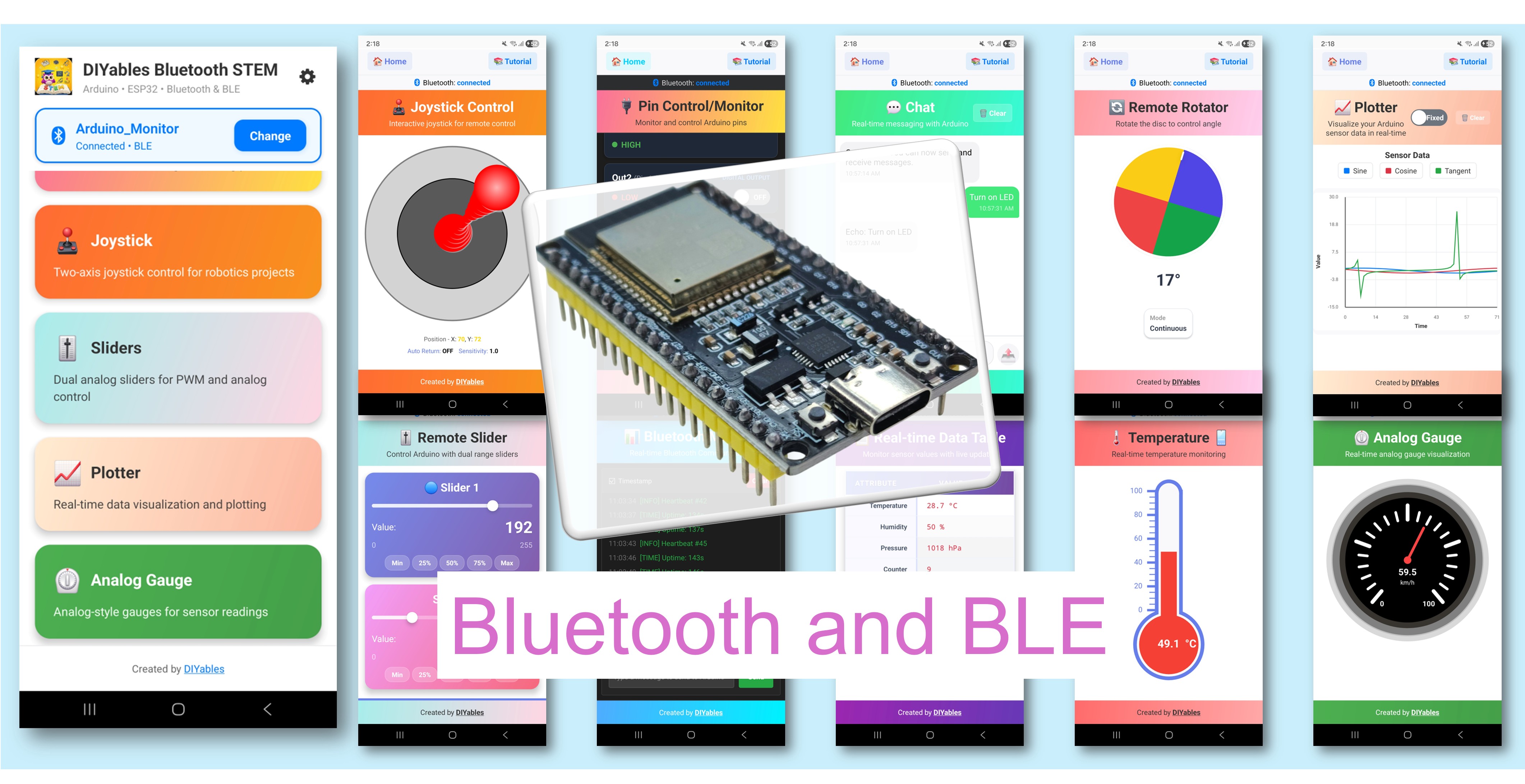
블루투스 다중 앱 예제는 여러 블루투스 앱 인터페이스를 하나의 ESP32 프로젝트에 결합하는 방법을 보여줍니다. 모니터, 채팅, 슬라이더, 조이스틱, 온도, 플로터, 테이블, 아날로그 게이지, 로테이터를 동시에 실행하세요 — DIYables Bluetooth STEM 앱을 통해 모두 접근 가능합니다. ESP32 보드용으로 설계되었으며 BLE(블루투스 저에너지)와 클래식 블루투스 연결을 모두 지원합니다. 여러 제어 및 표시 인터페이스가 동시에 필요한 복잡한 프로젝트에 이상적입니다.
이 예제는 두 가지 블루투스 모드를 지원합니다:
- ESP32 BLE (블루투스 저에너지): Android와 iOS 모두에서 작동
- ESP32 클래식 블루투스: Android에서만 작동. iOS는 클래식 블루투스를 지원하지 않습니다. iOS 지원이 필요한 경우 BLE를 사용하세요.
기능
- 하나에 9개 앱: 모니터, 채팅, 슬라이더, 조이스틱, 온도, 플로터, 테이블, 아날로그 게이지, 로테이터 동시 실행
- 독립적인 콜백: 각 앱에 자체 이벤트 핸들러
- 독립적인 타이밍: 각 앱에 대한 다른 업데이트 간격
- 앱 전환: 모바일 앱에서 자유롭게 앱 간 전환
- BLE & 클래식 블루투스: 프로젝트에 맞는 블루투스 모드 선택
- 크로스 플랫폼: BLE 모드는 Android와 iOS 모두에서 작동; 클래식 블루투스는 Android에서만 작동
- 저전력 옵션: BLE 모드는 클래식 블루투스보다 전력 소모가 적음
필요한 하드웨어
| 1 | × | 38-pin ESP32 ESP-WROOM-32 Dev Module - Narrow | 쿠팡 | 아마존 | |
| 1 | × | (또는) 38-pin ESP32 ESP-WROOM-32 Dev Module - Wide | 쿠팡 | 아마존 | |
| 1 | × | (또는) 30-pin ESP32 ESP-WROOM-32 Dev Module - Wide | 아마존 | |
| 1 | × | (또는) ESP32 Uno-form board | 아마존 | |
| 1 | × | (또는) ESP32 S3 Uno-form board | 아마존 | |
| 1 | × | USB 케이블 타입-A to 타입-C (USB-A PC용) | 쿠팡 | 아마존 | |
| 1 | × | USB 케이블 타입-C to 타입-C (USB-C PC용) | 아마존 | |
| 1 | × | 브레드보드 | 쿠팡 | 아마존 | |
| 1 | × | 점퍼케이블 | 쿠팡 | 아마존 | |
| 1 | × | (추천) ESP32용 스크루 터미널 확장 보드 | 쿠팡 | 아마존 | |
| 1 | × | (추천) Breakout Expansion Board for ESP32 | 쿠팡 | 아마존 | |
| 1 | × | (추천) ESP32용 전원 분배기 | 쿠팡 | 아마존 |
공개: 이 포스팅 에 제공된 일부 링크는 아마존 제휴 링크입니다. 이 포스팅은 쿠팡 파트너스 활동의 일환으로, 이에 따른 일정액의 수수료를 제공받습니다.
ESP32 코드
빠른 시작
다음 지침을 단계별로 따르세요:
- ESP32가 처음이라면 ESP32 - 소프트웨어 설치 튜토리얼을 참조하세요.
- USB 케이블로 ESP32 보드를 컴퓨터에 연결합니다.
- 컴퓨터에서 Arduino IDE를 실행합니다.
- 적절한 ESP32 보드와 COM 포트를 선택합니다.
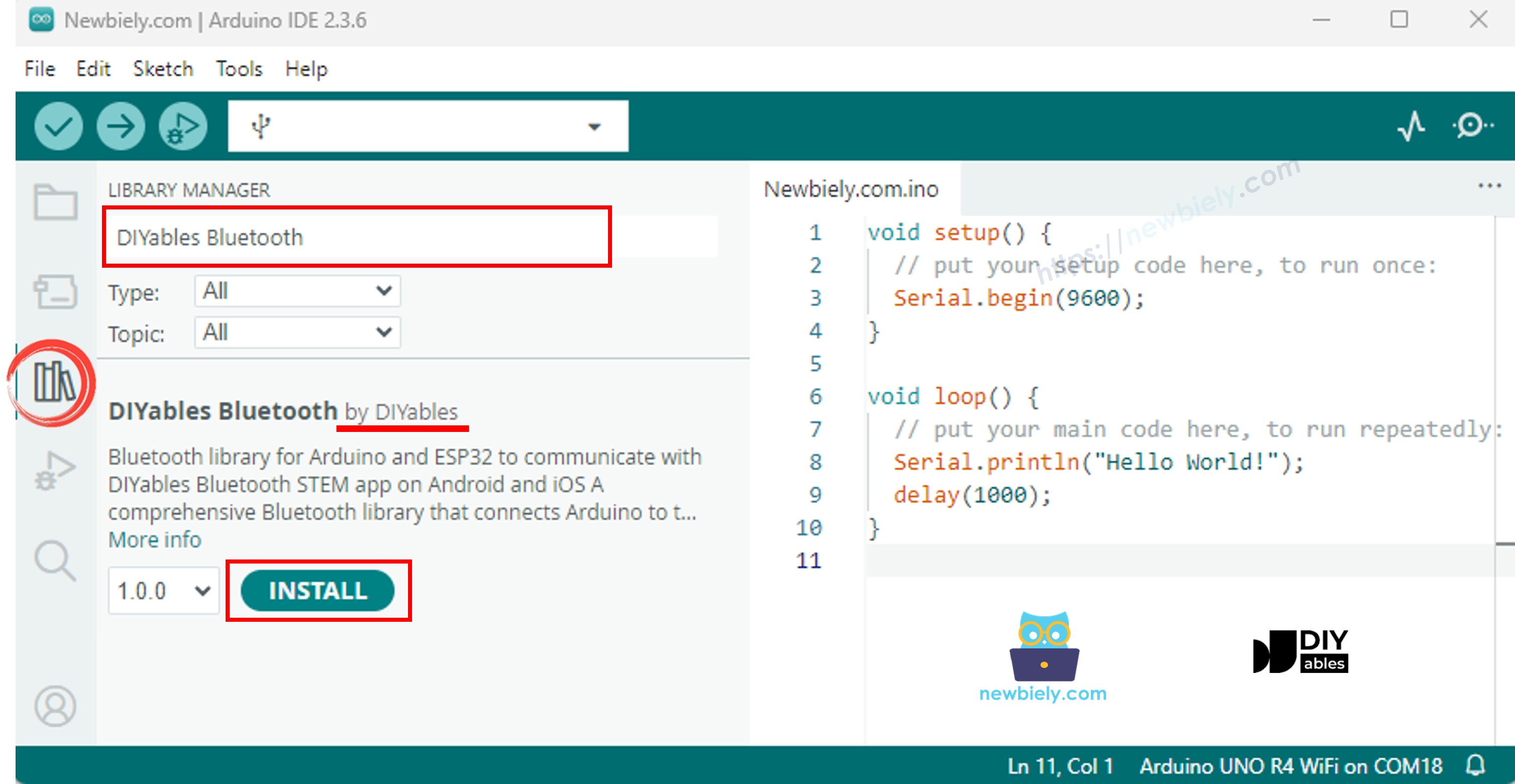
- Arduino IDE 왼쪽 바의 라이브러리 아이콘으로 이동합니다.
- "DIYables Bluetooth"를 검색한 다음 DIYables의 DIYables Bluetooth 라이브러리를 찾습니다.
- 설치 버튼을 클릭하여 라이브러리를 설치합니다.
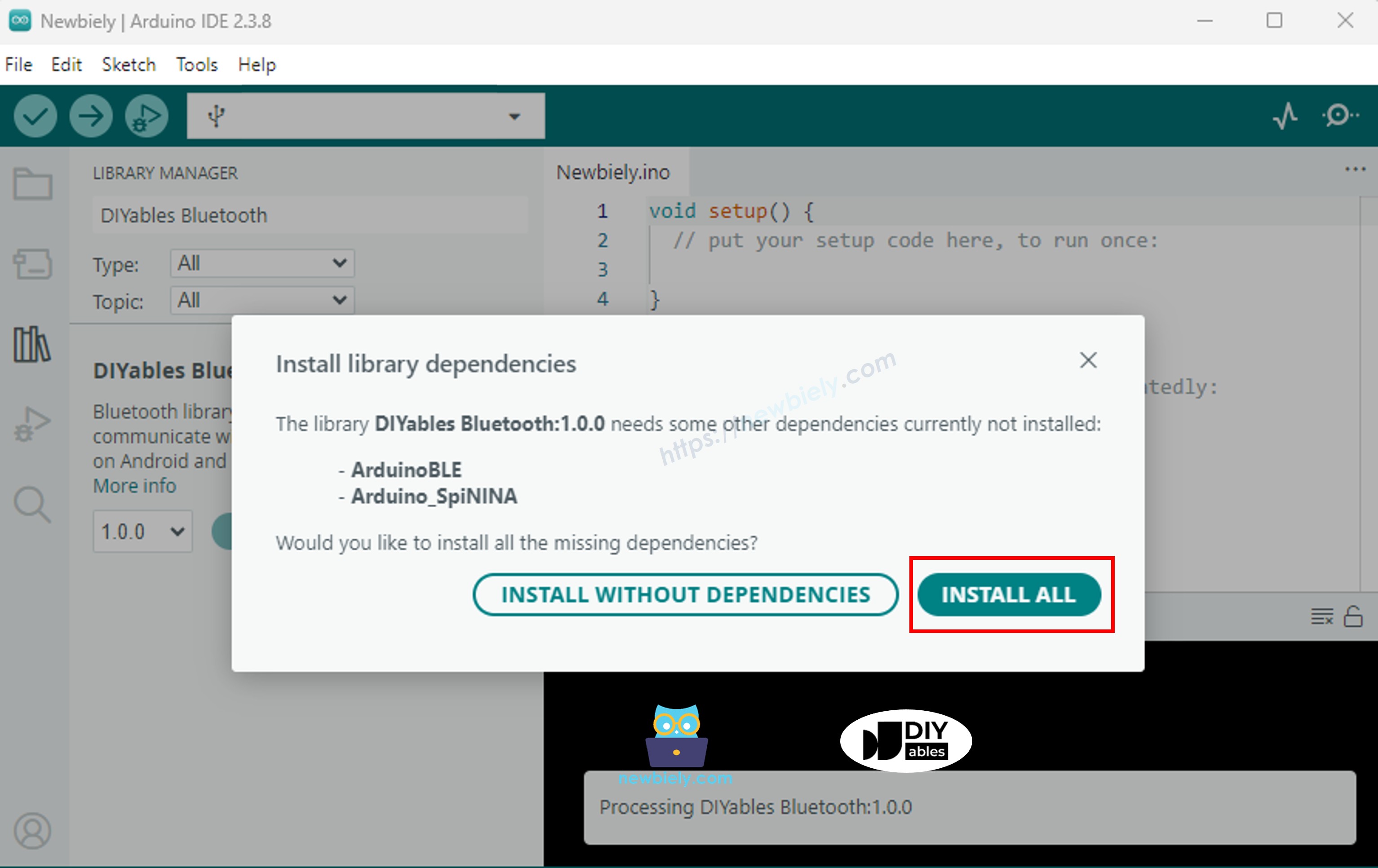
- 다른 라이브러리 종속성 설치 여부를 묻는 메시지가 표시됩니다.
- 모두 설치 버튼을 클릭하여 모든 라이브러리 종속성을 설치합니다.
> 중요: 이 예제에는 많은 블루투스 앱 라이브러리가 포함되어 있으므로 컴파일된 스케치가 일반보다 큽니다. 올바른 파티션 구성을 반드시 선택해야 합니다(아래 참조).
필요에 따라 아래 두 가지 블루투스 모드 중 하나를 선택하세요:
ESP32 클래식 블루투스 코드 (Android의 앱에서만 작동)
참고: 클래식 블루투스는 iOS에서 지원되지 않습니다. iOS 지원이 필요한 경우 아래 BLE 코드를 사용하세요.
- Arduino IDE에서 파일 예제 DIYables Bluetooth Esp32Bluetooth_MultipleApps 예제로 이동하거나, 위의 코드를 복사하여 Arduino IDE 편집기에 붙여넣습니다.
/*
* DIYables Bluetooth Library - ESP32 Classic Bluetooth Multiple Apps Example
* Works with DIYables Bluetooth STEM app on Android
* Note: Classic Bluetooth is NOT supported on iOS. Use BLE examples for iOS support.
*
* This example demonstrates how to use multiple Bluetooth apps simultaneously:
* - Monitor: Real-time serial monitoring and logging
* - Chat: Bi-directional text messaging
* - Slider: Dual slider control (0-255 range)
* - Joystick: Interactive joystick control (X, Y coordinates)
* - Temperature: Temperature monitoring and display
* - Plotter: Real-time data plotting (3 channels)
* - Table: Two-column data table with real-time updates
* - Analog Gauge: Circular gauge for sensor monitoring
* - Rotator: Rotatable disc/knob control
* - Pin Control: Digital pin control and monitoring
*
* Features:
* - All apps run simultaneously on a single Bluetooth connection
* - Automatic message routing to appropriate app handlers
* - Simplified callback system - no manual parsing needed
* - All Bluetooth protocol details handled by the library
* - Compatible with DIYables Bluetooth Mobile App
*
* Compatible Boards:
* - ESP32 (all variants with Classic Bluetooth)
* - ESP32-WROOM-32
* - ESP32-DevKitC
* - ESP32-WROVER
*
* Note: Select "Huge APP (3MB No OTA/1MB SPIFFS)" partition scheme
* in Arduino IDE: Tools > Partition Scheme
*
* Setup:
* 1. Upload the sketch to your ESP32
* 2. Open Serial Monitor (115200 baud)
* 3. Open DIYables Bluetooth App on your phone
* 4. Connect to "ESP32 Multi-App"
* 5. Navigate to different screens to test each app
*
* Tutorial: https://diyables.io/bluetooth-app
* Author: DIYables
*/
#include <DIYables_BluetoothServer.h>
#include <DIYables_BluetoothMonitor.h>
#include <DIYables_BluetoothChat.h>
#include <DIYables_BluetoothSlider.h>
#include <DIYables_BluetoothJoystick.h>
#include <DIYables_BluetoothTemperature.h>
#include <DIYables_BluetoothPlotter.h>
#include <DIYables_BluetoothTable.h>
#include <DIYables_BluetoothAnalogGauge.h>
#include <DIYables_BluetoothRotator.h>
#include <platforms/DIYables_Esp32Bluetooth.h>
// Create Bluetooth instances
DIYables_Esp32Bluetooth bluetooth("ESP32 Multi-App");
DIYables_BluetoothServer bluetoothServer(bluetooth);
// Create app instances
DIYables_BluetoothMonitor bluetoothMonitor;
DIYables_BluetoothChat bluetoothChat;
DIYables_BluetoothSlider bluetoothSlider(0, 255, 1);
DIYables_BluetoothJoystick bluetoothJoystick(false, 5);
DIYables_BluetoothTemperature bluetoothTemperature(-10.0, 50.0, "°C");
DIYables_BluetoothPlotter bluetoothPlotter;
DIYables_BluetoothTable bluetoothTable;
DIYables_BluetoothAnalogGauge bluetoothGauge(0.0, 100.0, "%");
DIYables_BluetoothRotator bluetoothRotator(ROTATOR_MODE_CONTINUOUS);
// ESP32 built-in LED (may vary by board)
const int LED_PIN = 2;
// State variables
int currentSlider1 = 128;
int currentSlider2 = 64;
int currentJoystickX = 0;
int currentJoystickY = 0;
float currentTemperature = 25.0;
float currentGaugeValue = 50.0;
float currentRotatorAngle = 0.0;
int messageCount = 0;
// Timing variables
unsigned long lastMonitorUpdate = 0;
unsigned long lastTempUpdate = 0;
unsigned long lastPlotUpdate = 0;
unsigned long lastTableUpdate = 0;
unsigned long lastGaugeUpdate = 0;
float plotPhase = 0;
void setup() {
Serial.begin(115200);
delay(1000);
Serial.println("DIYables Bluetooth - ESP32 Multiple Apps Example");
// Initialize built-in LED
pinMode(LED_PIN, OUTPUT);
digitalWrite(LED_PIN, LOW);
// Initialize Bluetooth server
bluetoothServer.begin();
// Register all apps with the server
bluetoothServer.addApp(&bluetoothMonitor);
bluetoothServer.addApp(&bluetoothChat);
bluetoothServer.addApp(&bluetoothSlider);
bluetoothServer.addApp(&bluetoothJoystick);
bluetoothServer.addApp(&bluetoothTemperature);
bluetoothServer.addApp(&bluetoothPlotter);
bluetoothServer.addApp(&bluetoothTable);
bluetoothServer.addApp(&bluetoothGauge);
bluetoothServer.addApp(&bluetoothRotator);
Serial.print("Registered apps: ");
Serial.println(bluetoothServer.getAppCount());
// Configure Plotter
bluetoothPlotter.setPlotTitle("Sensor Data");
bluetoothPlotter.setAxisLabels("Time", "Value");
bluetoothPlotter.setYAxisRange(-1.5, 1.5);
bluetoothPlotter.setMaxSamples(100);
bluetoothPlotter.setLegendLabels("Sine", "Cosine", "Random");
// Configure Table rows
bluetoothTable.addRow("Status");
bluetoothTable.addRow("Uptime");
bluetoothTable.addRow("Slider 1");
bluetoothTable.addRow("Slider 2");
bluetoothTable.addRow("Joystick X");
bluetoothTable.addRow("Joystick Y");
bluetoothTable.addRow("Temperature");
bluetoothTable.addRow("Gauge Value");
bluetoothTable.addRow("Rotator Angle");
bluetoothTable.addRow("Free Heap");
// Set up all callbacks
setupCallbacks();
Serial.println("Waiting for Bluetooth connection...");
}
void setupCallbacks() {
// ---- Connection events ----
bluetoothServer.setOnConnected([]() {
Serial.println("Bluetooth connected!");
digitalWrite(LED_PIN, HIGH);
bluetoothMonitor.send("=== ESP32 Multi-App Connected ===");
bluetoothMonitor.send("All apps are ready!");
bluetoothChat.send("Hello! ESP32 Multi-App is connected.");
});
bluetoothServer.setOnDisconnected([]() {
Serial.println("Bluetooth disconnected!");
digitalWrite(LED_PIN, LOW);
});
// ---- Monitor callbacks ----
bluetoothMonitor.onMonitorMessage([](const String& message) {
Serial.println("Monitor cmd: " + message);
if (message == "HELP") {
bluetoothMonitor.send("Commands: STATUS, HELP, LED_ON, LED_OFF, HEAP");
} else if (message == "STATUS") {
bluetoothMonitor.send("Slider1=" + String(currentSlider1) + " Slider2=" + String(currentSlider2));
bluetoothMonitor.send("Joystick X=" + String(currentJoystickX) + " Y=" + String(currentJoystickY));
bluetoothMonitor.send("Temp=" + String(currentTemperature, 1) + "°C");
bluetoothMonitor.send("Gauge=" + String(currentGaugeValue, 1) + "%");
bluetoothMonitor.send("Rotator=" + String(currentRotatorAngle, 0) + "°");
} else if (message == "LED_ON") {
digitalWrite(LED_PIN, HIGH);
bluetoothMonitor.send("LED turned ON");
} else if (message == "LED_OFF") {
digitalWrite(LED_PIN, LOW);
bluetoothMonitor.send("LED turned OFF");
} else if (message == "HEAP") {
bluetoothMonitor.send("Free Heap: " + String(ESP.getFreeHeap()) + " bytes");
} else {
bluetoothMonitor.send("Unknown: " + message + " (type HELP)");
}
});
// ---- Chat callbacks ----
bluetoothChat.onChatMessage([](const String& message) {
Serial.println("Chat: " + message);
bluetoothChat.send("Echo: " + message);
if (message.equalsIgnoreCase("ping")) {
bluetoothChat.send("pong!");
} else if (message.equalsIgnoreCase("status")) {
bluetoothChat.send("Uptime: " + String(millis() / 1000) + "s, Apps: " + String(bluetoothServer.getAppCount()));
} else if (message.equalsIgnoreCase("heap")) {
bluetoothChat.send("Free heap: " + String(ESP.getFreeHeap()) + " bytes");
}
});
// ---- Slider callbacks ----
bluetoothSlider.onSliderValue([](int slider1, int slider2) {
currentSlider1 = slider1;
currentSlider2 = slider2;
Serial.print("Slider 1: "); Serial.print(slider1);
Serial.print(", Slider 2: "); Serial.println(slider2);
// Update gauge based on slider 1
currentGaugeValue = map(slider1, 0, 255, 0, 100);
bluetoothGauge.send(currentGaugeValue);
// Update table
bluetoothTable.sendValueUpdate("Slider 1", String(slider1));
bluetoothTable.sendValueUpdate("Slider 2", String(slider2));
bluetoothTable.sendValueUpdate("Gauge Value", String(currentGaugeValue, 1) + "%");
});
bluetoothSlider.onGetConfig([]() {
bluetoothSlider.send(currentSlider1, currentSlider2);
});
// ---- Joystick callbacks ----
bluetoothJoystick.onJoystickValue([](int x, int y) {
currentJoystickX = x;
currentJoystickY = y;
Serial.print("Joystick X: "); Serial.print(x);
Serial.print(", Y: "); Serial.println(y);
// Update table
bluetoothTable.sendValueUpdate("Joystick X", String(x));
bluetoothTable.sendValueUpdate("Joystick Y", String(y));
});
bluetoothJoystick.onGetConfig([]() {
bluetoothJoystick.send(currentJoystickX, currentJoystickY);
});
// ---- Temperature callbacks ----
bluetoothTemperature.onTemperatureRequest([]() {
bluetoothTemperature.send(currentTemperature);
});
// ---- Plotter callbacks ----
bluetoothPlotter.onDataRequest([]() {
Serial.println("Plotter data requested");
});
// ---- Table callbacks ----
bluetoothTable.onDataRequest([]() {
Serial.println("Table data requested");
bluetoothTable.sendTableStructure();
updateAllTableValues();
});
// ---- Gauge callbacks ----
bluetoothGauge.onValueRequest([]() {
bluetoothGauge.send(currentGaugeValue);
});
// ---- Rotator callbacks ----
bluetoothRotator.onRotatorAngle([](float angle) {
currentRotatorAngle = angle;
Serial.print("Rotator: "); Serial.print(angle); Serial.println("°");
bluetoothTable.sendValueUpdate("Rotator Angle", String(angle, 0) + "°");
});
}
void updateAllTableValues() {
bluetoothTable.sendValueUpdate("Status", "Running");
unsigned long uptime = millis() / 1000;
String uptimeStr;
if (uptime >= 60) {
uptimeStr = String(uptime / 60) + "m " + String(uptime % 60) + "s";
} else {
uptimeStr = String(uptime) + "s";
}
bluetoothTable.sendValueUpdate("Uptime", uptimeStr);
bluetoothTable.sendValueUpdate("Slider 1", String(currentSlider1));
bluetoothTable.sendValueUpdate("Slider 2", String(currentSlider2));
bluetoothTable.sendValueUpdate("Joystick X", String(currentJoystickX));
bluetoothTable.sendValueUpdate("Joystick Y", String(currentJoystickY));
bluetoothTable.sendValueUpdate("Temperature", String(currentTemperature, 1) + " °C");
bluetoothTable.sendValueUpdate("Gauge Value", String(currentGaugeValue, 1) + "%");
bluetoothTable.sendValueUpdate("Rotator Angle", String(currentRotatorAngle, 0) + "°");
bluetoothTable.sendValueUpdate("Free Heap", String(ESP.getFreeHeap()) + " bytes");
}
void loop() {
bluetoothServer.loop();
if (!bluetooth.isConnected()) {
delay(10);
return;
}
// ---- Monitor: periodic status every 5 seconds ----
if (millis() - lastMonitorUpdate >= 5000) {
lastMonitorUpdate = millis();
messageCount++;
bluetoothMonitor.send("[INFO] Heartbeat #" + String(messageCount) + " - Uptime: " + String(millis() / 1000) + "s");
}
// ---- Temperature: update every 2 seconds ----
if (millis() - lastTempUpdate >= 2000) {
lastTempUpdate = millis();
// Simulate temperature with slight variation
static float tempOffset = 0;
tempOffset += random(-10, 11) / 10.0;
if (tempOffset > 5.0) tempOffset = 5.0;
if (tempOffset < -5.0) tempOffset = -5.0;
currentTemperature = 25.0 + tempOffset;
bluetoothTemperature.send(currentTemperature);
bluetoothTable.sendValueUpdate("Temperature", String(currentTemperature, 1) + " °C");
}
// ---- Plotter: update every 100ms ----
if (millis() - lastPlotUpdate >= 100) {
lastPlotUpdate = millis();
float sine = sin(plotPhase);
float cosine = cos(plotPhase);
float noise = random(-50, 51) / 100.0;
bluetoothPlotter.send(sine, cosine, noise);
plotPhase += 0.1;
if (plotPhase > 2 * PI) plotPhase = 0;
}
// ---- Table: update uptime every 5 seconds ----
if (millis() - lastTableUpdate >= 5000) {
lastTableUpdate = millis();
unsigned long uptime = millis() / 1000;
String uptimeStr;
if (uptime >= 60) {
uptimeStr = String(uptime / 60) + "m " + String(uptime % 60) + "s";
} else {
uptimeStr = String(uptime) + "s";
}
bluetoothTable.sendValueUpdate("Uptime", uptimeStr);
bluetoothTable.sendValueUpdate("Free Heap", String(ESP.getFreeHeap()) + " bytes");
}
// ---- Gauge: simulate sensor every 3 seconds ----
if (millis() - lastGaugeUpdate >= 3000) {
lastGaugeUpdate = millis();
float sensorValue = 50.0 + 30.0 * sin(millis() / 10000.0);
currentGaugeValue = sensorValue;
bluetoothGauge.send(currentGaugeValue);
bluetoothTable.sendValueUpdate("Gauge Value", String(currentGaugeValue, 1) + "%");
}
delay(10);
}
- 중요: 도구 > 파티션 구성으로 이동하여 "Huge APP (3MB No OTA/1MB SPIFFS)"를 선택합니다. 다중 앱 예제는 상당히 많은 플래시 공간을 사용하므로 필수 설정입니다.
- Arduino IDE에서 업로드 버튼을 클릭하여 ESP32에 코드를 업로드합니다.
- 시리얼 모니터를 엽니다.
- 시리얼 모니터에서 결과를 확인합니다. 다음과 같이 표시됩니다:
8
Serial.println("Hello World!");
Message (Enter to send message to 'ESP32 Dev Module' on 'COM15')
New Line
9600 baud
DIYables Bluetooth - ESP32 Multiple Apps Example
Waiting for Bluetooth connection...
ESP32 BLE 코드 (Android과 iOS 앱 모두에서 작동)
- Arduino IDE에서 파일 예제 DIYables Bluetooth Esp32BLE_MultipleApps 예제로 이동하거나, 위의 코드를 복사하여 Arduino IDE 편집기에 붙여넣습니다.
/*
* DIYables Bluetooth Library - ESP32 BLE Multiple Apps Example
* Works with DIYables Bluetooth STEM app on Android and iOS
*
* This example demonstrates how to use multiple Bluetooth apps simultaneously:
* - Monitor, Chat, Slider, Joystick, Temperature, Plotter,
* Table, Analog Gauge, Rotator
*
* Compatible Boards:
* - ESP32-WROOM-32
* - ESP32-DevKitC
* - ESP32-WROVER
* - ESP32-S3
* - ESP32-C3
* - Any ESP32 board supporting BLE
*
* Note: Select "Huge APP (3MB No OTA/1MB SPIFFS)" partition scheme
* in Arduino IDE: Tools > Partition Scheme
*
* Setup:
* 1. Upload the sketch to your ESP32
* 2. Open Serial Monitor (115200 baud)
* 3. Open DIYables Bluetooth App on your phone
* 4. Connect to "ESP32BLE Multi-App"
* 5. Navigate to different screens to test each app
*
* Tutorial: https://diyables.io/bluetooth-app
* Author: DIYables
*/
#include <DIYables_BluetoothServer.h>
#include <DIYables_BluetoothMonitor.h>
#include <DIYables_BluetoothChat.h>
#include <DIYables_BluetoothSlider.h>
#include <DIYables_BluetoothJoystick.h>
#include <DIYables_BluetoothTemperature.h>
#include <DIYables_BluetoothPlotter.h>
#include <DIYables_BluetoothTable.h>
#include <DIYables_BluetoothAnalogGauge.h>
#include <DIYables_BluetoothRotator.h>
#include <platforms/DIYables_Esp32BLE.h>
// BLE Configuration
const char* DEVICE_NAME = "ESP32BLE Multi-App";
const char* SERVICE_UUID = "19B10000-E8F2-537E-4F6C-D104768A1214";
const char* TX_UUID = "19B10001-E8F2-537E-4F6C-D104768A1214";
const char* RX_UUID = "19B10002-E8F2-537E-4F6C-D104768A1214";
// Create Bluetooth instances
DIYables_Esp32BLE bluetooth(DEVICE_NAME, SERVICE_UUID, TX_UUID, RX_UUID);
DIYables_BluetoothServer bluetoothServer(bluetooth);
// Create app instances
DIYables_BluetoothMonitor bluetoothMonitor;
DIYables_BluetoothChat bluetoothChat;
DIYables_BluetoothSlider bluetoothSlider(0, 255, 1);
DIYables_BluetoothJoystick bluetoothJoystick(false, 5);
DIYables_BluetoothTemperature bluetoothTemperature(-10.0, 50.0, "°C");
DIYables_BluetoothPlotter bluetoothPlotter;
DIYables_BluetoothTable bluetoothTable;
DIYables_BluetoothAnalogGauge bluetoothGauge(0.0, 100.0, "%");
DIYables_BluetoothRotator bluetoothRotator(ROTATOR_MODE_CONTINUOUS);
// State variables
int currentSlider1 = 128;
int currentSlider2 = 64;
int currentJoystickX = 0;
int currentJoystickY = 0;
float currentTemperature = 25.0;
float currentGaugeValue = 50.0;
float currentRotatorAngle = 0.0;
int messageCount = 0;
// Timing variables
unsigned long lastMonitorUpdate = 0;
unsigned long lastTempUpdate = 0;
unsigned long lastPlotUpdate = 0;
unsigned long lastTableUpdate = 0;
unsigned long lastGaugeUpdate = 0;
float plotPhase = 0;
void setup() {
Serial.begin(115200);
delay(1000);
Serial.println("DIYables Bluetooth - ESP32 BLE Multiple Apps Example");
pinMode(2, OUTPUT);
digitalWrite(2, LOW);
bluetoothServer.begin();
bluetoothServer.addApp(&bluetoothMonitor);
bluetoothServer.addApp(&bluetoothChat);
bluetoothServer.addApp(&bluetoothSlider);
bluetoothServer.addApp(&bluetoothJoystick);
bluetoothServer.addApp(&bluetoothTemperature);
bluetoothServer.addApp(&bluetoothPlotter);
bluetoothServer.addApp(&bluetoothTable);
bluetoothServer.addApp(&bluetoothGauge);
bluetoothServer.addApp(&bluetoothRotator);
Serial.print("Registered apps: ");
Serial.println(bluetoothServer.getAppCount());
bluetoothPlotter.setPlotTitle("Sensor Data");
bluetoothPlotter.setAxisLabels("Time", "Value");
bluetoothPlotter.setYAxisRange(-1.5, 1.5);
bluetoothPlotter.setMaxSamples(100);
bluetoothPlotter.setLegendLabels("Sine", "Cosine", "Random");
bluetoothTable.addRow("Status");
bluetoothTable.addRow("Uptime");
bluetoothTable.addRow("Slider 1");
bluetoothTable.addRow("Slider 2");
bluetoothTable.addRow("Joystick X");
bluetoothTable.addRow("Joystick Y");
bluetoothTable.addRow("Temperature");
bluetoothTable.addRow("Gauge Value");
bluetoothTable.addRow("Rotator Angle");
bluetoothTable.addRow("Messages");
setupCallbacks();
Serial.println("Waiting for Bluetooth connection...");
}
void setupCallbacks() {
bluetoothServer.setOnConnected([]() {
Serial.println("Bluetooth connected!");
digitalWrite(2, HIGH);
bluetoothMonitor.send("=== ESP32 BLE Multi-App Connected ===");
bluetoothMonitor.send("All apps are ready!");
bluetoothChat.send("Hello! ESP32 BLE Multi-App is connected.");
});
bluetoothServer.setOnDisconnected([]() {
Serial.println("Bluetooth disconnected!");
digitalWrite(2, LOW);
});
bluetoothMonitor.onMonitorMessage([](const String& message) {
Serial.println("Monitor cmd: " + message);
if (message == "HELP") {
bluetoothMonitor.send("Commands: STATUS, HELP, LED_ON, LED_OFF, HEAP");
} else if (message == "STATUS") {
bluetoothMonitor.send("Slider1=" + String(currentSlider1) + " Slider2=" + String(currentSlider2));
bluetoothMonitor.send("Joystick X=" + String(currentJoystickX) + " Y=" + String(currentJoystickY));
bluetoothMonitor.send("Temp=" + String(currentTemperature, 1) + "°C");
bluetoothMonitor.send("Gauge=" + String(currentGaugeValue, 1) + "%");
bluetoothMonitor.send("Rotator=" + String(currentRotatorAngle, 0) + "°");
} else if (message == "LED_ON") {
digitalWrite(2, HIGH);
bluetoothMonitor.send("LED turned ON");
} else if (message == "LED_OFF") {
digitalWrite(2, LOW);
bluetoothMonitor.send("LED turned OFF");
} else if (message == "HEAP") {
bluetoothMonitor.send("Free heap: " + String(ESP.getFreeHeap()) + " bytes");
} else {
bluetoothMonitor.send("Unknown: " + message + " (type HELP)");
}
});
bluetoothChat.onChatMessage([](const String& message) {
Serial.println("Chat: " + message);
bluetoothChat.send("Echo: " + message);
if (message.equalsIgnoreCase("ping")) {
bluetoothChat.send("pong!");
} else if (message.equalsIgnoreCase("status")) {
bluetoothChat.send("Uptime: " + String(millis() / 1000) + "s, Apps: " + String(bluetoothServer.getAppCount()));
}
});
bluetoothSlider.onSliderValue([](int slider1, int slider2) {
currentSlider1 = slider1;
currentSlider2 = slider2;
Serial.print("Slider 1: "); Serial.print(slider1);
Serial.print(", Slider 2: "); Serial.println(slider2);
currentGaugeValue = map(slider1, 0, 255, 0, 100);
bluetoothGauge.send(currentGaugeValue);
bluetoothTable.sendValueUpdate("Slider 1", String(slider1));
bluetoothTable.sendValueUpdate("Slider 2", String(slider2));
bluetoothTable.sendValueUpdate("Gauge Value", String(currentGaugeValue, 1) + "%");
});
bluetoothSlider.onGetConfig([]() {
bluetoothSlider.send(currentSlider1, currentSlider2);
});
bluetoothJoystick.onJoystickValue([](int x, int y) {
currentJoystickX = x;
currentJoystickY = y;
Serial.print("Joystick X: "); Serial.print(x);
Serial.print(", Y: "); Serial.println(y);
bluetoothTable.sendValueUpdate("Joystick X", String(x));
bluetoothTable.sendValueUpdate("Joystick Y", String(y));
});
bluetoothJoystick.onGetConfig([]() {
bluetoothJoystick.send(currentJoystickX, currentJoystickY);
});
bluetoothTemperature.onTemperatureRequest([]() {
bluetoothTemperature.send(currentTemperature);
});
bluetoothPlotter.onDataRequest([]() {
Serial.println("Plotter data requested");
});
bluetoothTable.onDataRequest([]() {
Serial.println("Table data requested");
bluetoothTable.sendTableStructure();
updateAllTableValues();
});
bluetoothGauge.onValueRequest([]() {
bluetoothGauge.send(currentGaugeValue);
});
bluetoothRotator.onRotatorAngle([](float angle) {
currentRotatorAngle = angle;
Serial.print("Rotator: "); Serial.print(angle); Serial.println("°");
bluetoothTable.sendValueUpdate("Rotator Angle", String(angle, 0) + "°");
});
}
void updateAllTableValues() {
bluetoothTable.sendValueUpdate("Status", "Running");
unsigned long uptime = millis() / 1000;
String uptimeStr;
if (uptime >= 60) {
uptimeStr = String(uptime / 60) + "m " + String(uptime % 60) + "s";
} else {
uptimeStr = String(uptime) + "s";
}
bluetoothTable.sendValueUpdate("Uptime", uptimeStr);
bluetoothTable.sendValueUpdate("Slider 1", String(currentSlider1));
bluetoothTable.sendValueUpdate("Slider 2", String(currentSlider2));
bluetoothTable.sendValueUpdate("Joystick X", String(currentJoystickX));
bluetoothTable.sendValueUpdate("Joystick Y", String(currentJoystickY));
bluetoothTable.sendValueUpdate("Temperature", String(currentTemperature, 1) + " °C");
bluetoothTable.sendValueUpdate("Gauge Value", String(currentGaugeValue, 1) + "%");
bluetoothTable.sendValueUpdate("Rotator Angle", String(currentRotatorAngle, 0) + "°");
bluetoothTable.sendValueUpdate("Messages", String(messageCount));
}
void loop() {
bluetoothServer.loop();
if (!bluetooth.isConnected()) {
delay(10);
return;
}
if (millis() - lastMonitorUpdate >= 5000) {
lastMonitorUpdate = millis();
messageCount++;
bluetoothMonitor.send("[INFO] Heartbeat #" + String(messageCount) + " - Uptime: " + String(millis() / 1000) + "s");
}
if (millis() - lastTempUpdate >= 2000) {
lastTempUpdate = millis();
static float tempOffset = 0;
tempOffset += random(-10, 11) / 10.0;
if (tempOffset > 5.0) tempOffset = 5.0;
if (tempOffset < -5.0) tempOffset = -5.0;
currentTemperature = 25.0 + tempOffset;
bluetoothTemperature.send(currentTemperature);
bluetoothTable.sendValueUpdate("Temperature", String(currentTemperature, 1) + " °C");
}
if (millis() - lastPlotUpdate >= 100) {
lastPlotUpdate = millis();
float sine = sin(plotPhase);
float cosine = cos(plotPhase);
float noise = random(-50, 51) / 100.0;
bluetoothPlotter.send(sine, cosine, noise);
plotPhase += 0.1;
if (plotPhase > 2 * PI) plotPhase = 0;
}
if (millis() - lastTableUpdate >= 5000) {
lastTableUpdate = millis();
unsigned long uptime = millis() / 1000;
String uptimeStr;
if (uptime >= 60) {
uptimeStr = String(uptime / 60) + "m " + String(uptime % 60) + "s";
} else {
uptimeStr = String(uptime) + "s";
}
bluetoothTable.sendValueUpdate("Uptime", uptimeStr);
bluetoothTable.sendValueUpdate("Messages", String(messageCount));
}
if (millis() - lastGaugeUpdate >= 3000) {
lastGaugeUpdate = millis();
float sensorValue = 50.0 + 30.0 * sin(millis() / 10000.0);
currentGaugeValue = sensorValue;
bluetoothGauge.send(currentGaugeValue);
bluetoothTable.sendValueUpdate("Gauge Value", String(currentGaugeValue, 1) + "%");
}
delay(10);
}
- 중요: 도구 > 파티션 구성으로 이동하여 "Huge APP (3MB No OTA/1MB SPIFFS)"를 선택합니다. 다중 앱 예제는 상당히 많은 플래시 공간을 사용하므로 필수 설정입니다.
- Arduino IDE에서 업로드 버튼을 클릭하여 ESP32에 코드를 업로드합니다.
- 시리얼 모니터를 엽니다.
- 시리얼 모니터에서 결과를 확인합니다. 다음과 같이 표시됩니다:
8
Serial.println("Hello World!");
Message (Enter to send message to 'ESP32 Dev Module' on 'COM15')
New Line
9600 baud
DIYables Bluetooth - ESP32 BLE Multiple Apps Example
Waiting for Bluetooth connection...
모바일 앱
- ESP32 클래식 블루투스 코드를 사용하는 경우, 앱을 열기 전에 Android 폰과 ESP32를 페어링해야 합니다:
- 폰의 설정 > 블루투스로 이동합니다.
- 블루투스가 켜져 있는지 확인합니다.
- 폰이 사용 가능한 기기를 검색합니다.
- 사용 가능한 기기 목록에서 "ESP32 Multi-App"을 찾아 탭합니다.
- 페어링 요청을 확인합니다(PIN 필요 없음).
- 기기 이름 아래에 "페어링됨"이 표시될 때까지 기다립니다.
- ESP32 BLE 코드를 사용하는 경우, 페어링이 필요 없습니다. 다음 단계로 진행하면 됩니다.
- DIYables 블루투스 앱을 엽니다.
- 앱을 처음 열 때 권한을 요청합니다. 다음을 허용해 주세요:
- 주변 기기 권한 (Android 12+) / 블루투스 권한 (iOS) - 블루투스 기기를 검색하고 연결하는 데 필요
- 위치 권한 (Android 11 이하만 해당) - BLE 기기 검색을 위해 이전 Android 버전에서 필요
- 폰에서 블루투스가 켜져 있는지 확인합니다.
- 홈 화면에서 연결 버튼을 탭합니다. 앱이 BLE 및 클래식 블루투스 기기를 모두 검색합니다.
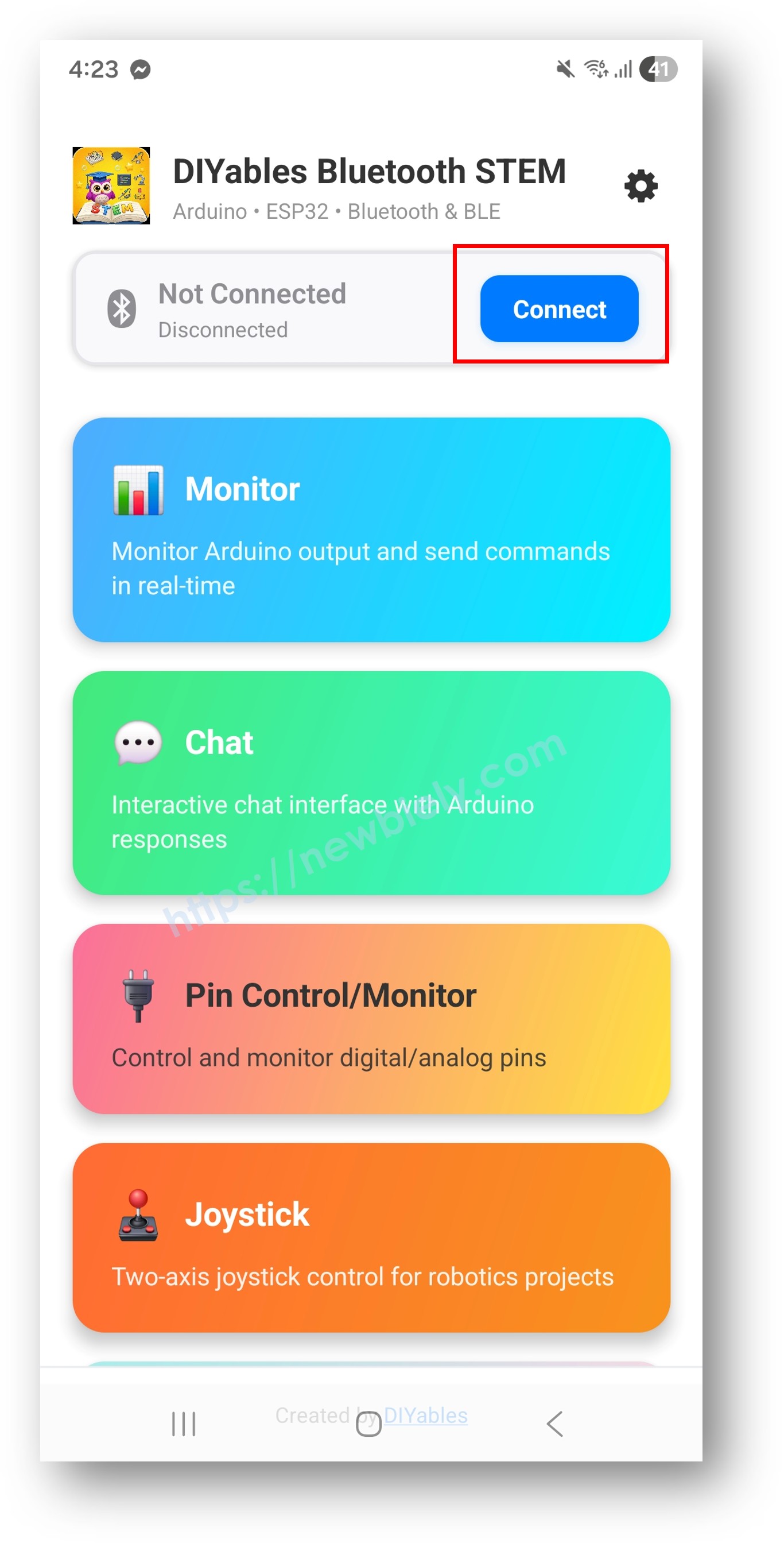
- 검색 결과에서 기기를 찾아 탭하여 연결합니다:
- 클래식 블루투스의 경우: "ESP32 Multi-App" 탭
- BLE의 경우: "ESP32BLE Multi-App" 탭
- 연결되면 앱이 자동으로 홈 화면으로 돌아갑니다. 홈 화면에 사용 가능한 모든 앱이 표시됩니다. Arduino 코드에서 초기화된 9개 앱이 응답하고 작동합니다 — 홈 화면의 다른 앱은 표시되지만 이 스케치에서는 작동하지 않습니다.
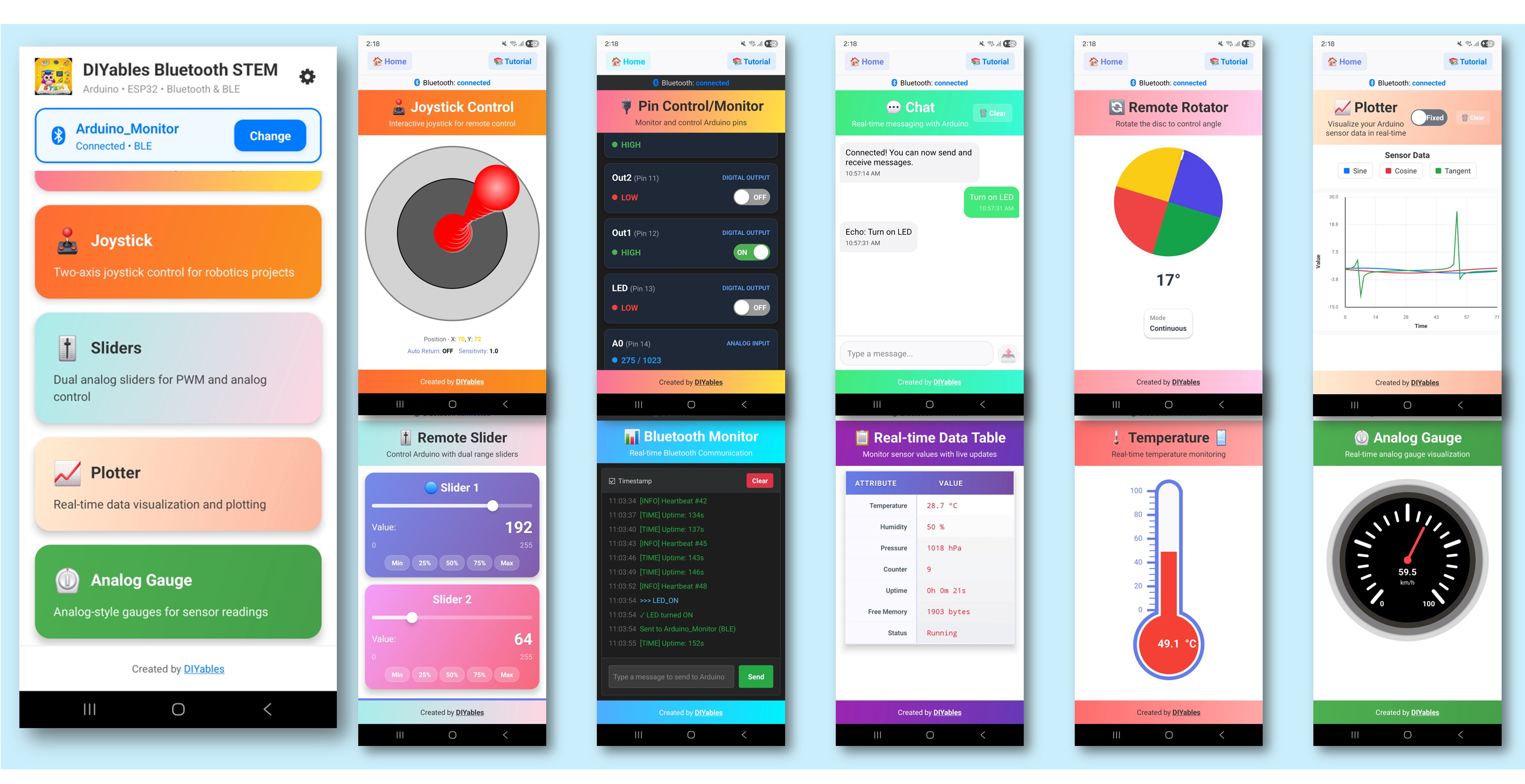
참고: 홈 화면에서 설정 아이콘을 탭하여 홈 화면에서 앱을 숨기거나 표시할 수 있습니다. 자세한 내용은 DIYables 블루투스 앱 사용 설명서를 참조하세요.
- 다음 앱 중 일부를 탭하여 ESP32와 인터랙션하세요: Monitor, Chat, Slider, Joystick, Temperature, Plotter, Table, Analog Gauge, Rotator
- 앱 간에 자유롭게 전환하세요 — 모두 동일한 블루투스 연결을 공유합니다.
Arduino IDE의 시리얼 모니터를 다시 보면 다음과 같이 표시됩니다:
8
Serial.println("Hello World!");
Message (Enter to send message to 'ESP32 Dev Module' on 'COM15')
New Line
9600 baud
Bluetooth connected!
Monitor: Uptime: 5s | Free heap: 245780 bytes
Temperature: 25.3°C
Plotter values sent
Table values updated
Gauge value: 50.0
창의적인 커스터마이징 - 프로젝트에 맞게 코드 조정하기
다중 앱 동작 방식
각 앱은 별도의 객체로 생성되고 동일한 블루투스 서버에 등록됩니다. 단일 블루투스 연결을 공유하지만 독립적으로 작동합니다:
// Include all app headers
#include <DIYables_BluetoothMonitor.h>
#include <DIYables_BluetoothChat.h>
#include <DIYables_BluetoothSlider.h>
#include <DIYables_BluetoothJoystick.h>
#include <DIYables_BluetoothTemperature.h>
#include <DIYables_BluetoothPlotter.h>
#include <DIYables_BluetoothTable.h>
#include <DIYables_BluetoothAnalogGauge.h>
#include <DIYables_BluetoothRotator.h>
// Create app instances
DIYables_BluetoothMonitor bluetoothMonitor;
DIYables_BluetoothChat bluetoothChat;
DIYables_BluetoothSlider bluetoothSlider(0, 100, 1);
DIYables_BluetoothJoystick bluetoothJoystick;
DIYables_BluetoothTemperature bluetoothTemperature(-10.0, 50.0, "°C");
DIYables_BluetoothPlotter bluetoothPlotter;
DIYables_BluetoothTable bluetoothTable;
DIYables_BluetoothAnalogGauge bluetoothGauge(0.0, 100.0, "km/h");
DIYables_BluetoothRotator bluetoothRotator(ROTATOR_MODE_LIMITED, 0, 180);
// Register all apps with the Bluetooth server
bluetoothServer.addApp(bluetoothMonitor);
bluetoothServer.addApp(bluetoothChat);
bluetoothServer.addApp(bluetoothSlider);
bluetoothServer.addApp(bluetoothJoystick);
bluetoothServer.addApp(bluetoothTemperature);
bluetoothServer.addApp(bluetoothPlotter);
bluetoothServer.addApp(bluetoothTable);
bluetoothServer.addApp(bluetoothGauge);
bluetoothServer.addApp(bluetoothRotator);
각 앱의 콜백 설정
각 앱에는 자체 이벤트 핸들러가 있습니다:
void setup() {
// Monitor - receives text commands
bluetoothMonitor.onMonitorMessage([](String message) {
Serial.println("Monitor received: " + message);
});
// Chat - two-way messaging
bluetoothChat.onChatMessage([](String message) {
Serial.println("Chat: " + message);
bluetoothChat.send("Echo: " + message);
});
// Slider - value changes
bluetoothSlider.onSliderValue([](int slider1, int slider2) {
Serial.println("Slider: " + String(slider1));
});
// Joystick - directional input
bluetoothJoystick.onJoystickValue([](int x, int y) {
Serial.println("Joystick: X=" + String(x) + " Y=" + String(y));
});
// Rotator - angle changes
bluetoothRotator.onRotatorAngle([](float angle) {
Serial.println("Rotator: " + String(angle) + "°");
});
}


