ESP32 SSD1309 OLED 디스플레이 128x64 | 2.42인치 I2C OLED 튜토리얼

OLED(유기 발광 다이오드) 디스플레이는 깊은 블랙, 높은 명암비, 넓은 시야각을 제공하는 자발광 픽셀을 갖추어 기존 LCD보다 훨씬 우수한 업그레이드입니다. SSD1309는 2.42인치(2.4인치라고도 표시됨) 128×64 I2C OLED 모듈에서 흔히 발견되는 드라이버 IC입니다.
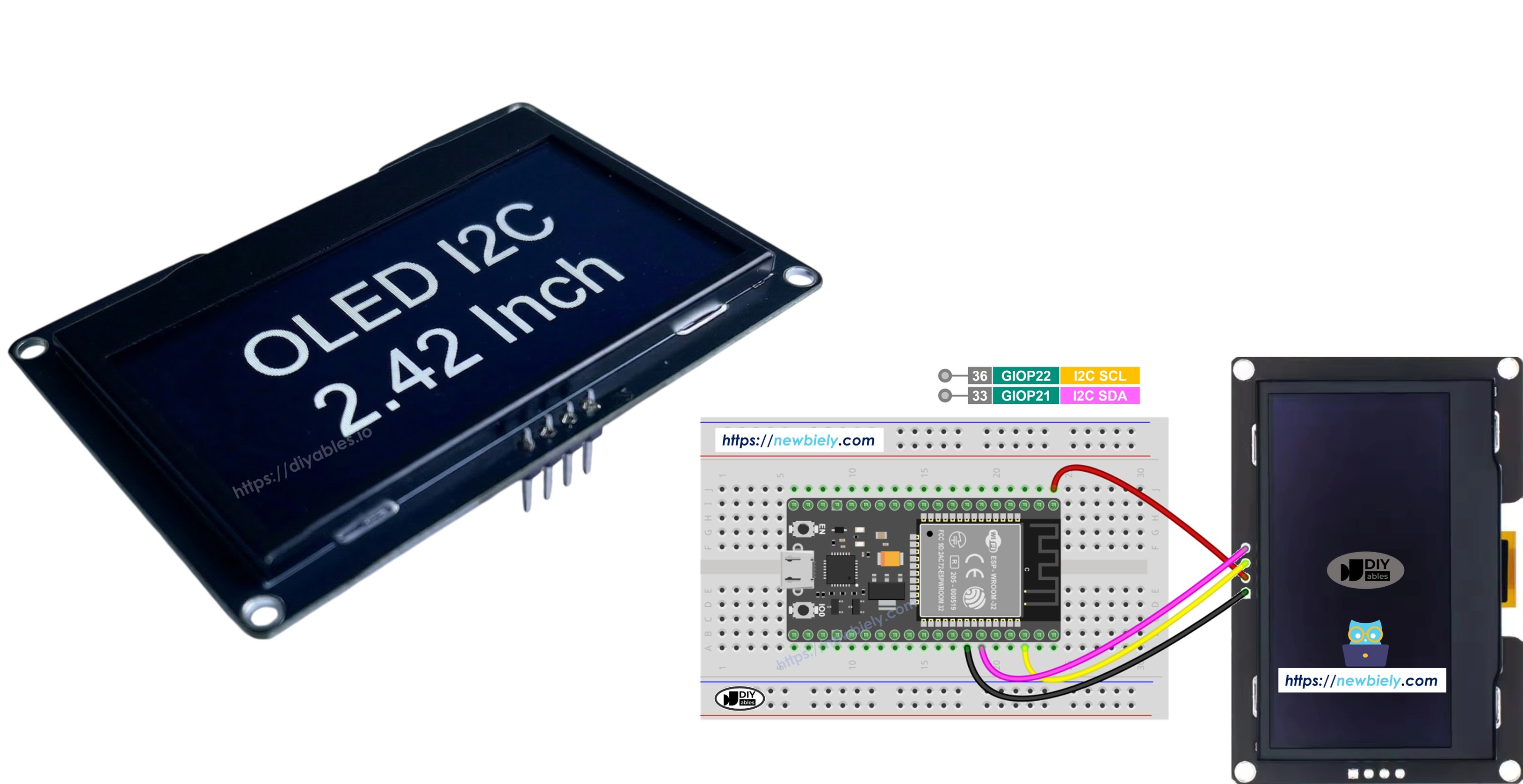
ESP32 ssd1309 2.42인치 oLED

이 단계별 가이드에서는 DIYables_OLED_SSD1309 라이브러리를 사용하여 SSD1309 OLED 128×64를 ESP32 보드와 연결하고 프로그래밍하는 방법을 배웁니다. 구체적으로 다음 사항을 다룹니다:

필요한 하드웨어

1×38-pin ESP32 ESP-WROOM-32 Dev Module - Narrow 쿠팡 | 아마존
1×(또는) 38-pin ESP32 ESP-WROOM-32 Dev Module - Wide 쿠팡 | 아마존
1×(또는) 30-pin ESP32 ESP-WROOM-32 Dev Module - Wide 아마존
1×(또는) ESP32 Uno-form board 아마존
1×(또는) ESP32 S3 Uno-form board 아마존
1×USB 케이블 타입-A to 타입-C (USB-A PC용) 쿠팡 | 아마존
1×USB 케이블 타입-C to 타입-C (USB-C PC용) 아마존
1×SSD1309 I2C OLED Display 128x64 (2.42 inch) 아마존
1×브레드보드 쿠팡 | 아마존
1×점퍼케이블 쿠팡 | 아마존
1×(옵션) DC 커넥터 전원 연결 잭 플러그 소켓 쿠팡 | 아마존
1×(추천) ESP32용 스크루 터미널 확장 보드 쿠팡 | 아마존
1×(추천) Breakout Expansion Board for ESP32 쿠팡 | 아마존
1×(추천) ESP32용 전원 분배기 쿠팡 | 아마존
공개: 이 포스팅 에 제공된 일부 링크는 아마존 제휴 링크입니다. 이 포스팅은 쿠팡 파트너스 활동의 일환으로, 이에 따른 일정액의 수수료를 제공받습니다.

SSD1309 2.42인치 OLED 디스플레이에 대하여

SSD1309는 128×64 도트 매트릭스 패널용으로 설계된 단일 칩 CMOS OLED 드라이버 IC입니다. 널리 사용되는 SSD1306과 레지스터 호환이 가능하므로 많은 기존 코드 예제를 최소한의 변경으로 사용할 수 있습니다. 주요 하드웨어 차이점은 다음과 같습니다:

  • 내장 차지 펌프 없음 — SSD1309는 외부 VCC 레일이 필요하지만 실제로 모든 브레이크아웃 보드(2.42인치 및 2.4인치 모듈 포함)에는 온보드 부스트 변환기가 내장되어 있으므로 사용자에게는 투명합니다.
  • 더 높은 전압 허용 — SSD1309는 최대 16V VCC를 수용하는 반면 SSD1306은 약 4.2V로 제한됩니다.

2.42인치(2.4인치) OLED 모듈은 일반적으로 SSD1309 드라이버를 사용하며 I2C 인터페이스로 128×64 픽셀 해상도를 제공합니다. 패널 색상(흰색, 파란색, 노란색, 녹색 또는 이중 구역)은 물리적 OLED 소재에 의해 결정되며 소프트웨어로 제어할 수 없습니다.

이 튜토리얼은 I2C 버스를 통해 디스플레이와 통신하며, 신호 와이어 두 개(SDA와 SCL)만 필요하고 다른 I2C 주변 장치와 버스를 공유할 수 있습니다.

SSD1309 OLED 핀아웃 (I2C 모듈)

일반적인 2.42인치 SSD1309 I2C OLED 모듈에는 네 개의 핀이 있습니다:

  • GND: ESP32의 접지에 연결해야 합니다.
  • VCC: ESP32의 3.3V 또는 5V 핀에 연결해야 합니다(모듈 사양 확인).
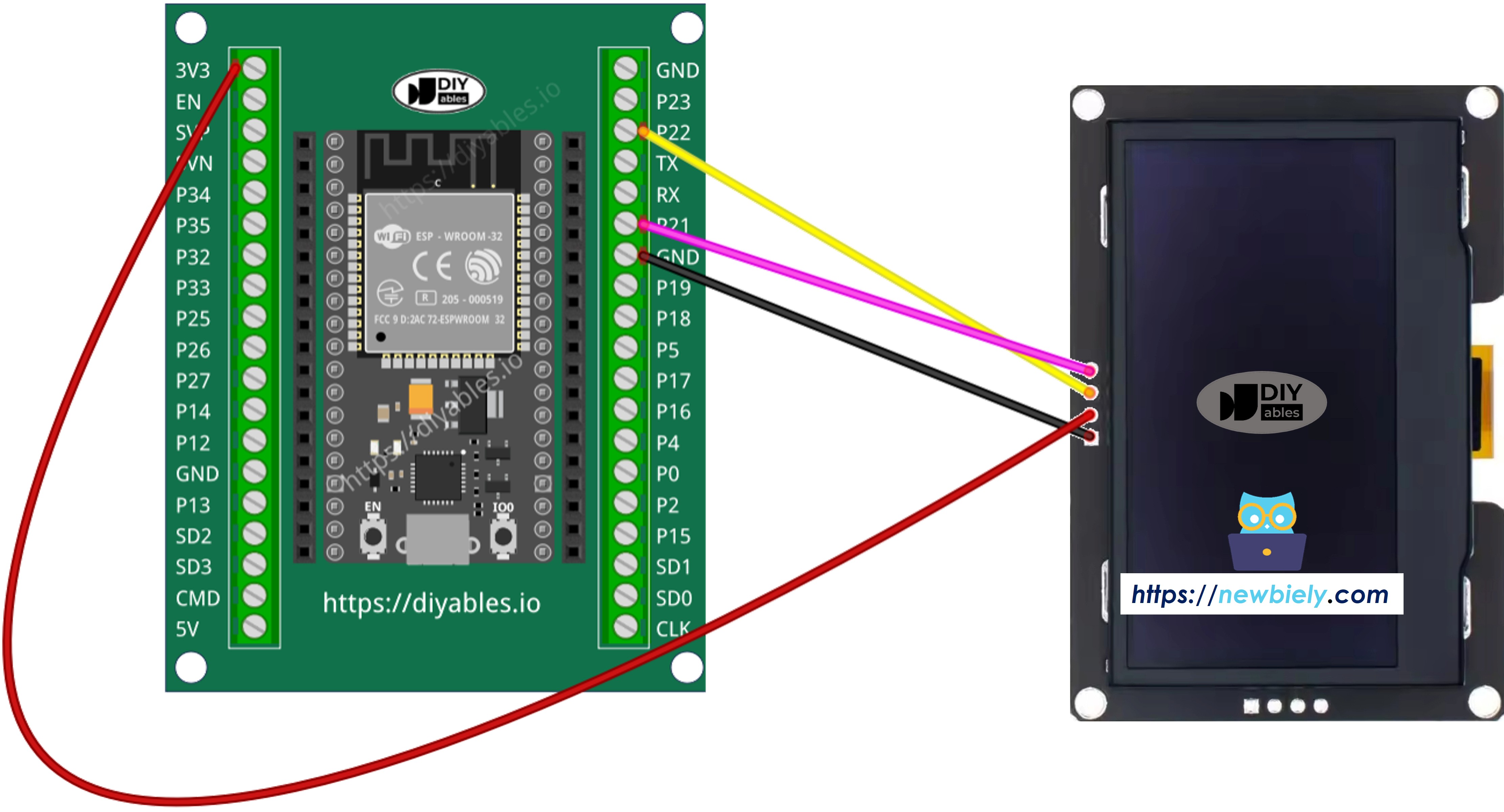
  • SCL 핀: I2C 클록 핀입니다. GPIO 22(기본 SCL)에 연결합니다.
  • SDA 핀: I2C 데이터 핀입니다. GPIO 21(기본 SDA)에 연결합니다.
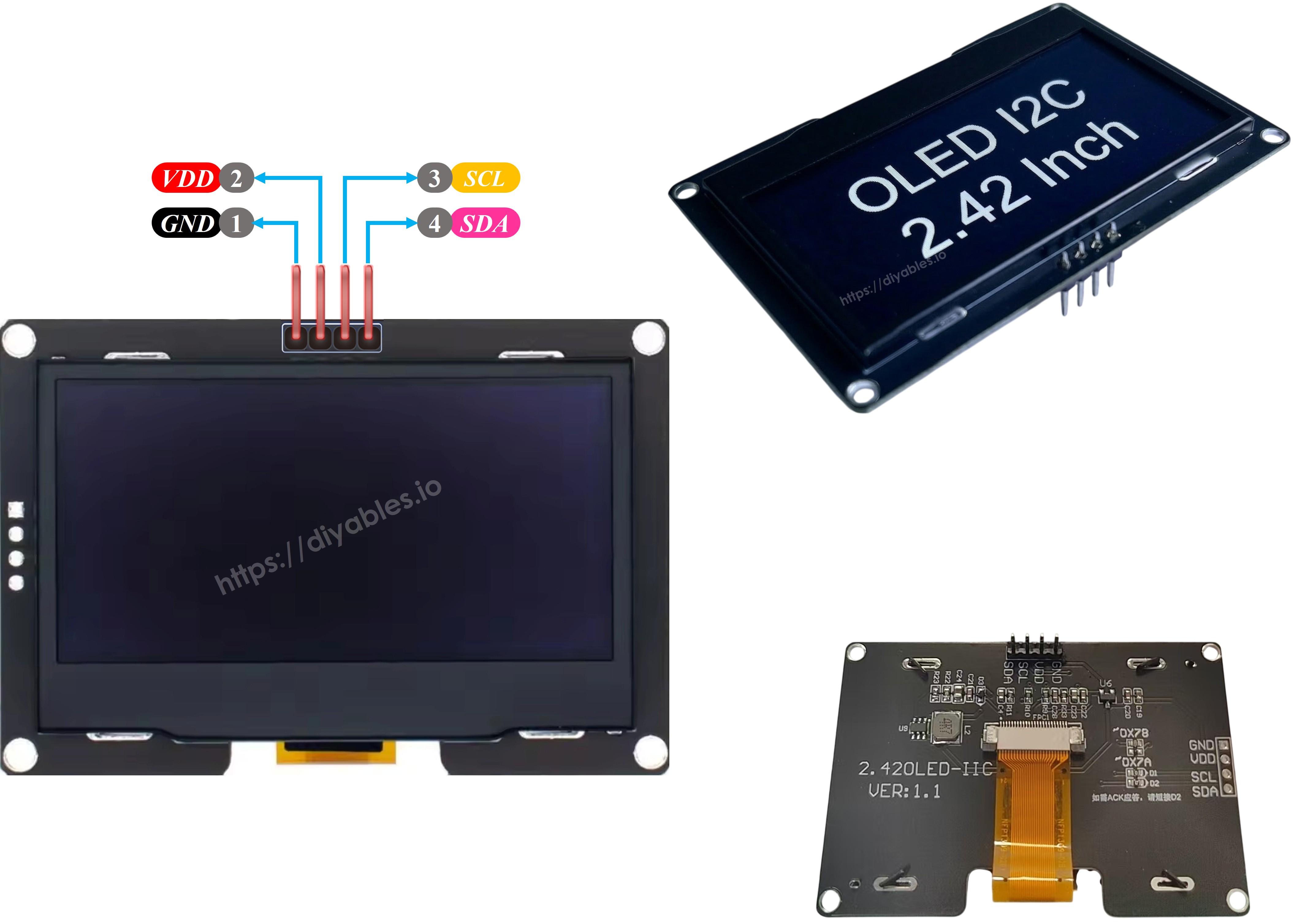
ssd1309 oLED 핀아웃

※ 주의:

핀 순서는 제조업체마다 다를 수 있습니다. OLED 모듈에 인쇄된 레이블을 항상 확인하세요.

배선 다이어그램

  • 브레드보드를 사용하여 ESP32를 SSD1309 OLED 128x64 디스플레이에 연결하는 방법
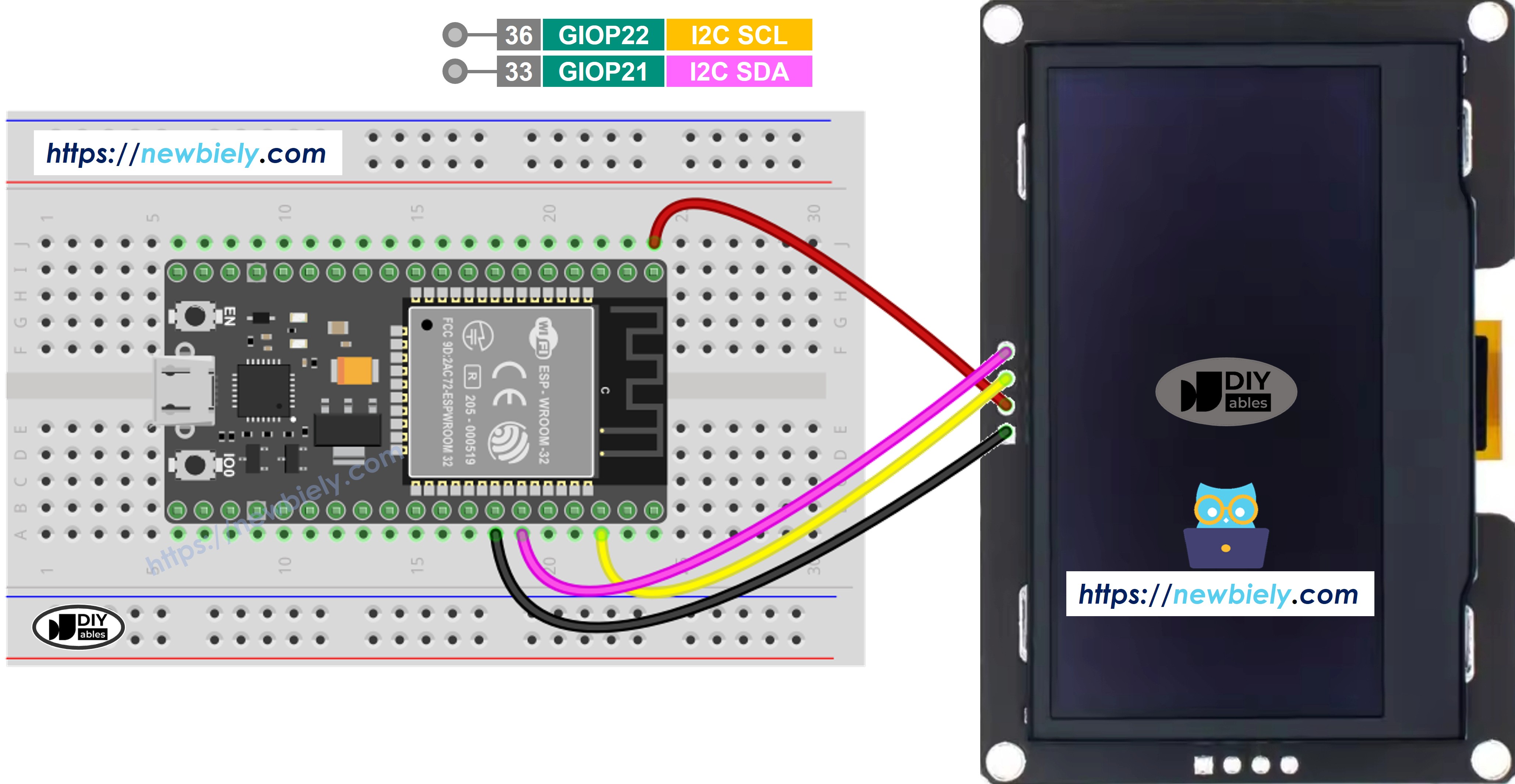
ESP32 ssd1309 oLED 128x64 배선 다이어그램

이 이미지는 Fritzing을 사용하여 만들어졌습니다. 이미지를 확대하려면 클릭하세요.

ESP32 및 다른 구성 요소에 전원을 공급하는 방법에 대해 잘 알지 못하는 경우, 다음 튜토리얼에서 안내를 찾을 수 있습니다: ESP32 전원 공급 방법.

ESP32와 ssd1309 oLED 연결 방법

이 이미지는 Fritzing을 사용하여 만들어졌습니다. 이미지를 확대하려면 클릭하세요.

SSD1309 OLED를 위한 ESP32 프로그래밍 방법

DIYables_OLED_SSD1309 라이브러리 설치

DIYables_OLED_SSD1309 라이브러리는 SSD1309 디스플레이에 특화되어 있으며 더 풍부한 그래픽 지원을 위해 Adafruit_GFX를 확장합니다.

  • Arduino IDE를 엽니다.
  • 왼쪽 사이드바의 라이브러리 아이콘으로 이동합니다.
  • DIYables_OLED_SSD1309를 검색합니다.
  • 설치를 클릭합니다.
  • 종속성 프롬프트가 나타납니다 — 모두 설치를 클릭하여 도형 그리기 및 폰트에 필요한 Adafruit GFX Library도 함께 설치합니다.
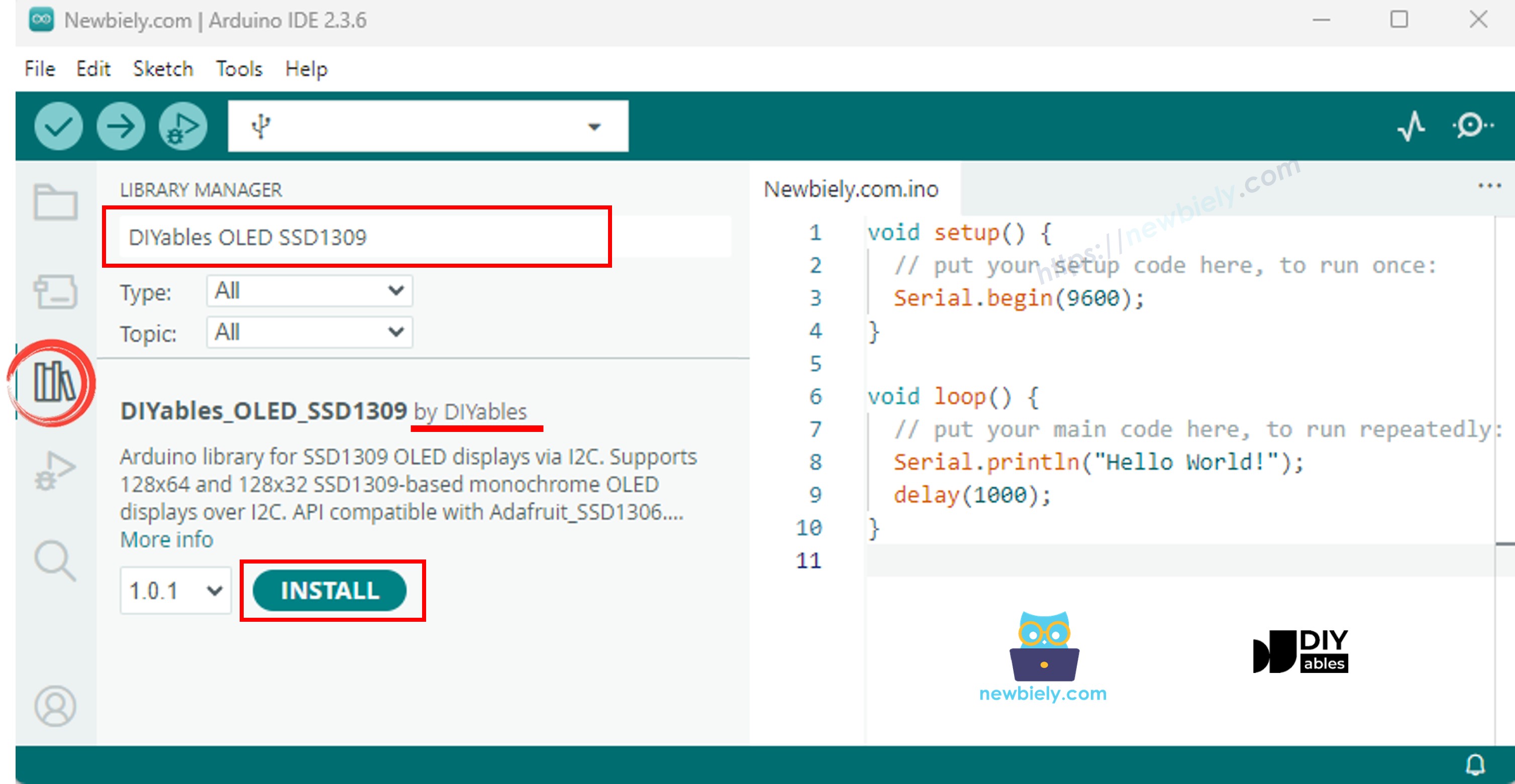
ESP32 ssd1309 oLED 라이브러리

프로그래밍 단계

  1. 필요한 라이브러리 포함
#include <Wire.h> #include <Adafruit_GFX.h> #include <DIYables_OLED_SSD1309.h>
  1. 화면 크기 정의
#define SCREEN_WIDTH 128 #define SCREEN_HEIGHT 64
  1. 디스플레이 객체 선언
#define OLED_RESET -1 // Reset pin not used on most I2C modules #define SCREEN_ADDRESS 0x3C DIYables_OLED_SSD1309 display(SCREEN_WIDTH, SCREEN_HEIGHT, &Wire, OLED_RESET);
  1. setup()에서 OLED 초기화
if (!display.begin(SSD1309_SWITCHCAPVCC, SCREEN_ADDRESS)) { Serial.println(F("SSD1309 allocation failed")); for (;;); // halt }
  1. 콘텐츠 표시
display.clearDisplay(); display.setTextSize(2); display.setTextColor(SSD1309_PIXEL_ON); display.setCursor(0, 20); display.println(F("Hello ESP32")); display.display(); // push buffer to screen

ESP32 코드 — SSD1309 OLED에서 Hello World

가장 간단한 시작점: 다양한 크기로 몇 줄의 텍스트를 출력합니다.

/* * 이 ESP32 코드는 newbiely.kr 에서 개발되었습니다 * 이 ESP32 코드는 어떠한 제한 없이 공개 사용을 위해 제공됩니다. * 상세한 지침 및 연결도에 대해서는 다음을 방문하세요: * https://newbiely.kr/tutorials/esp32/esp32-ssd1309-oled-display */ /* * DIYables OLED SSD1309 – Hello World * Prints text in two sizes on the 2.42 inch 128x64 I2C OLED with ESP32. */ #include <Wire.h> #include <Adafruit_GFX.h> #include <DIYables_OLED_SSD1309.h> #define SCREEN_WIDTH 128 #define SCREEN_HEIGHT 64 #define OLED_RESET -1 #define SCREEN_ADDRESS 0x3C DIYables_OLED_SSD1309 display(SCREEN_WIDTH, SCREEN_HEIGHT, &Wire, OLED_RESET); void setup() { Serial.begin(115200); if (!display.begin(SSD1309_SWITCHCAPVCC, SCREEN_ADDRESS)) { Serial.println(F("SSD1309 allocation failed")); for (;;); } display.clearDisplay(); display.setTextSize(1); // 6x8 pixels per character display.setTextColor(SSD1309_PIXEL_ON); // turn pixels on display.setCursor(0, 0); display.println(F("Hello, World!")); display.println(); display.setTextSize(2); // 12x16 pixels per character display.println(F("DIYables")); display.setTextSize(1); display.println(); display.println(F("SSD1309 OLED 128x64")); display.display(); // push buffer to screen } void loop() { }

ESP32 코드 — SSD1309 OLED에서 텍스트 표시

다음 예제는 다양한 크기, 숫자 포맷, RAM 절약을 위한 F() 매크로 등 더 많은 텍스트 기능을 보여줍니다.

/* * 이 ESP32 코드는 newbiely.kr 에서 개발되었습니다 * 이 ESP32 코드는 어떠한 제한 없이 공개 사용을 위해 제공됩니다. * 상세한 지침 및 연결도에 대해서는 다음을 방문하세요: * https://newbiely.kr/tutorials/esp32/esp32-ssd1309-oled-display */ /* * DIYables OLED SSD1309 – Display Text * Displays text in various sizes and formats on the 2.42" SSD1309 OLED with ESP32. */ #include <Wire.h> #include <Adafruit_GFX.h> #include <DIYables_OLED_SSD1309.h> #define SCREEN_WIDTH 128 #define SCREEN_HEIGHT 64 #define OLED_RESET -1 #define SCREEN_ADDRESS 0x3C DIYables_OLED_SSD1309 display(SCREEN_WIDTH, SCREEN_HEIGHT, &Wire, OLED_RESET); void setup() { Serial.begin(115200); if (!display.begin(SSD1309_SWITCHCAPVCC, SCREEN_ADDRESS)) { Serial.println(F("SSD1309 allocation failed")); for (;;); } display.clearDisplay(); // Various text sizes display.setTextSize(1); display.setTextColor(SSD1309_PIXEL_ON); display.setCursor(0, 0); display.println(F("Size 1 - DIYables")); display.setTextSize(2); display.println(F("Size 2")); display.setTextSize(3); display.println(F("Sz3")); display.display(); delay(3000); // Number formatting display.clearDisplay(); display.setTextSize(1); display.setCursor(0, 0); int value = 42; float pi = 3.14159; display.print(F("Integer: ")); display.println(value); display.print(F("Float: ")); display.println(pi, 2); // 2 decimal places display.print(F("Hex: 0x")); display.println(value, HEX); display.print(F("Binary: 0b")); display.println(value, BIN); display.display(); } void loop() { }

유용한 디스플레이 함수 참조

SSD1309 OLED를 DIYables 라이브러리로 작업할 때 가장 자주 사용되는 함수 목록입니다:

  • oled.clearDisplay() — 프레임 버퍼를 지웁니다(모든 픽셀 끄기).
  • oled.display() — 버퍼를 OLED로 전송하여 변경 사항이 보이도록 합니다.
  • oled.drawPixel(x, y, color) — 개별 픽셀을 설정하거나 지웁니다.
  • oled.setTextSize(n) — 폰트를 n 배율로 스케일링합니다(1 = 6×8, 2 = 12×16, …, 최대 8).
  • oled.setCursor(x, y) — 텍스트 커서를 픽셀 좌표 *(x, y)*로 이동합니다.
  • oled.setTextColor(SSD1309_PIXEL_ON) — 텍스트 전경만(배경 투명).
  • oled.setTextColor(SSD1309_PIXEL_OFF, SSD1309_PIXEL_ON) — 명시적 배경색이 있는 텍스트.
  • oled.println("message") — 문자열을 출력하고 다음 줄로 이동합니다.
  • oled.println(number) — 정수를 십진수로 출력합니다.
  • oled.println(number, HEX) — 정수를 16진수로 출력합니다.
  • oled.startscrollright(start, stop) — 페이지 *start*와 *stop* 사이에서 오른쪽으로 하드웨어 스크롤합니다.
  • oled.startscrollleft(start, stop) — 왼쪽으로 하드웨어 스크롤합니다.
  • oled.startscrolldiagright(start, stop) — 대각선 오른쪽으로 하드웨어 스크롤합니다.
  • oled.startscrolldiagleft(start, stop) — 대각선 왼쪽으로 하드웨어 스크롤합니다.
  • oled.stopscroll() — 활성 하드웨어 스크롤을 중지합니다.
  • oled.setContrast(value) — 디스플레이 밝기를 조절합니다(0–255).
  • oled.dim(true/false) — 디스플레이를 최소 밝기로 빠르게 어둡게 하거나 이전 명암으로 복원합니다.
  • oled.invertDisplay(true/false) — 하드웨어 수준의 색상 반전(켜진 픽셀 ↔ 꺼진 픽셀).

SSD1309 OLED에서 텍스트를 수직 및 수평으로 중앙 정렬하는 방법

OLED에서 수직/수평 중앙 정렬 방법을 참조하세요.

ESP32 코드 — SSD1309 OLED에서 도형 그리기

DIYables_OLED_SSD1309 라이브러리는 Adafruit_GFX를 확장하므로 픽셀, 선, 직사각형, 채워진 직사각형, 원, 채워진 원, 삼각형, 채워진 삼각형, 둥근 직사각형 등 완전한 도형 그리기 기본 요소 세트를 제공합니다. 아래 스케치는 애니메이션 데모로 이 모든 것을 순환합니다.

/* * 이 ESP32 코드는 newbiely.kr 에서 개발되었습니다 * 이 ESP32 코드는 어떠한 제한 없이 공개 사용을 위해 제공됩니다. * 상세한 지침 및 연결도에 대해서는 다음을 방문하세요: * https://newbiely.kr/tutorials/esp32/esp32-ssd1309-oled-display */ /* * DIYables OLED SSD1309 – Draw Shapes * Demonstrates drawing pixels, lines, rectangles, circles, and triangles on the 2.42" OLED with ESP32. */ #include <Wire.h> #include <Adafruit_GFX.h> #include <DIYables_OLED_SSD1309.h> #define SCREEN_WIDTH 128 #define SCREEN_HEIGHT 64 #define OLED_RESET -1 #define SCREEN_ADDRESS 0x3C DIYables_OLED_SSD1309 display(SCREEN_WIDTH, SCREEN_HEIGHT, &Wire, OLED_RESET); void setup() { Serial.begin(115200); if (!display.begin(SSD1309_SWITCHCAPVCC, SCREEN_ADDRESS)) { Serial.println(F("SSD1309 allocation failed")); for (;;); } display.clearDisplay(); display.display(); } void loop() { // Draw pixels display.clearDisplay(); for (int i = 0; i < 20; i++) { display.drawPixel(random(SCREEN_WIDTH), random(SCREEN_HEIGHT), SSD1309_PIXEL_ON); } display.display(); delay(2000); // Draw lines display.clearDisplay(); for (int y = 0; y < SCREEN_HEIGHT; y += 8) { display.drawLine(0, 0, SCREEN_WIDTH - 1, y, SSD1309_PIXEL_ON); } display.display(); delay(2000); // Draw rectangles display.clearDisplay(); display.drawRect(10, 10, 40, 30, SSD1309_PIXEL_ON); // outline display.fillRect(60, 10, 40, 30, SSD1309_PIXEL_ON); // filled display.drawRoundRect(10, 45, 40, 15, 5, SSD1309_PIXEL_ON); // rounded corners display.display(); delay(2000); // Draw circles display.clearDisplay(); display.drawCircle(32, 32, 20, SSD1309_PIXEL_ON); // outline display.fillCircle(96, 32, 20, SSD1309_PIXEL_ON); // filled display.display(); delay(2000); // Draw triangles display.clearDisplay(); display.drawTriangle(20, 10, 10, 50, 30, 50, SSD1309_PIXEL_ON); // outline display.fillTriangle(90, 10, 70, 50, 110, 50, SSD1309_PIXEL_ON); // filled display.display(); delay(2000); }

ESP32 코드 — SSD1309 OLED에서 하드웨어 스크롤

SSD1309에는 CPU 부하 없이 디스플레이 내용을 이동시키는 내장 스크롤 엔진이 있습니다. DIYables 라이브러리는 네 가지 스크롤 방향(오른쪽, 왼쪽, 대각선 오른쪽, 대각선 왼쪽)을 제공합니다. 각각 시작 페이지와 종료 페이지 매개변수를 받습니다(페이지는 64픽셀 높이 디스플레이에서 번호가 0–7인 8픽셀 높이 수평 스트립).

※ 주의:

스크롤을 시작하기 전에 반드시 display()를 호출하여 콘텐츠를 OLED로 푸시하세요. 스크롤이 활성화된 동안 새 콘텐츠를 그리지 마세요 — 먼저 stopscroll()을 호출하세요.

/* * 이 ESP32 코드는 newbiely.kr 에서 개발되었습니다 * 이 ESP32 코드는 어떠한 제한 없이 공개 사용을 위해 제공됩니다. * 상세한 지침 및 연결도에 대해서는 다음을 방문하세요: * https://newbiely.kr/tutorials/esp32/esp32-ssd1309-oled-display */ /* * DIYables OLED SSD1309 – Scroll Text * Demonstrates all four hardware scroll directions on the 2.42" OLED with ESP32. */ #include <Wire.h> #include <Adafruit_GFX.h> #include <DIYables_OLED_SSD1309.h> #define SCREEN_WIDTH 128 #define SCREEN_HEIGHT 64 #define OLED_RESET -1 #define SCREEN_ADDRESS 0x3C DIYables_OLED_SSD1309 display(SCREEN_WIDTH, SCREEN_HEIGHT, &Wire, OLED_RESET); void setup() { Serial.begin(115200); if (!display.begin(SSD1309_SWITCHCAPVCC, SCREEN_ADDRESS)) { Serial.println(F("SSD1309 allocation failed")); for (;;); } display.clearDisplay(); display.setTextSize(2); display.setTextColor(SSD1309_PIXEL_ON); display.setCursor(10, 24); display.println(F("DIYables")); display.display(); delay(2000); } void loop() { // Scroll right across all pages display.startscrollright(0x00, 0x07); delay(3000); display.stopscroll(); delay(500); // Scroll left display.startscrollleft(0x00, 0x07); delay(3000); display.stopscroll(); delay(500); // Diagonal scroll right display.startscrolldiagright(0x00, 0x07); delay(3000); display.stopscroll(); delay(500); // Diagonal scroll left display.startscrolldiagleft(0x00, 0x07); delay(3000); display.stopscroll(); delay(500); }

ESP32 코드 — SSD1309 OLED에서 비트맵 이미지 표시

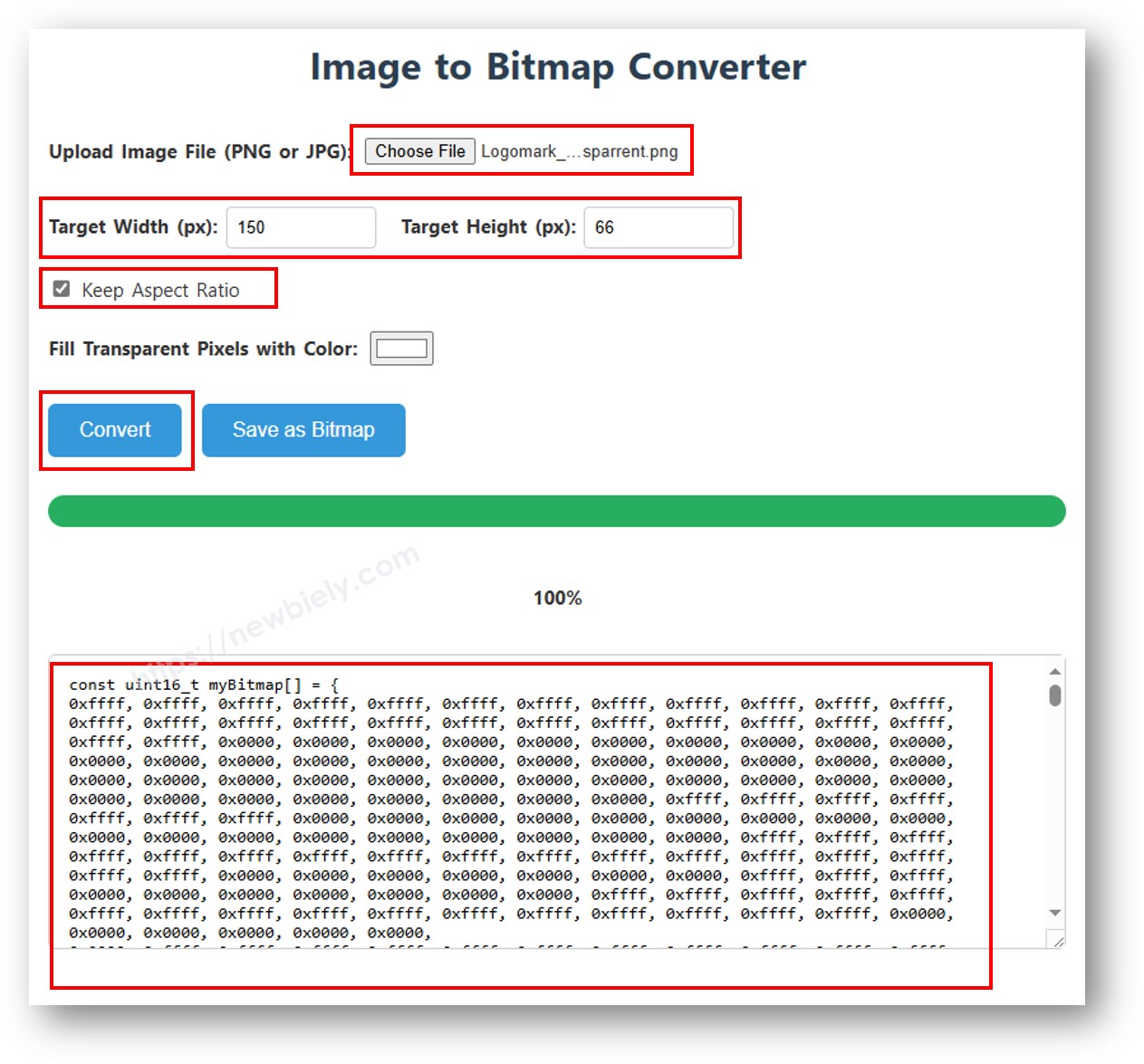
SSD1309 OLED에 비트맵을 표시하려면 먼저 이미지를 C 바이트 배열로 변환해야 합니다. 변환을 위해 무료 image2cpp 온라인 도구를 사용하세요:

  1. 이미지 파일(PNG, JPG, BMP 등)을 업로드합니다.
  2. 캔버스 크기를 128×64(또는 더 작게) 설정합니다.
  3. 출력 형식으로 Arduino 코드를 선택합니다.
  4. 생성된 배열을 스케치에 복사합니다.
이미지를 비트맵 배열로 변환

아래 예제는 16×16 하트 아이콘과 전체 너비 DIYables 로고를 번갈아 표시합니다:

/* * 이 ESP32 코드는 newbiely.kr 에서 개발되었습니다 * 이 ESP32 코드는 어떠한 제한 없이 공개 사용을 위해 제공됩니다. * 상세한 지침 및 연결도에 대해서는 다음을 방문하세요: * https://newbiely.kr/tutorials/esp32/esp32-ssd1309-oled-display */ /* * DIYables OLED SSD1309 – Display Bitmap Image * Shows a 16x16 heart icon and 128x64 DIYables logo on the 2.42" OLED with ESP32. */ #include <Wire.h> #include <Adafruit_GFX.h> #include <DIYables_OLED_SSD1309.h> #define SCREEN_WIDTH 128 #define SCREEN_HEIGHT 64 #define OLED_RESET -1 #define SCREEN_ADDRESS 0x3C DIYables_OLED_SSD1309 display(SCREEN_WIDTH, SCREEN_HEIGHT, &Wire, OLED_RESET); // 16x16 heart icon bitmap const unsigned char heart_icon[] PROGMEM = { 0x00, 0x00, 0x0c, 0x30, 0x1e, 0x78, 0x3f, 0xfc, 0x7f, 0xfe, 0xff, 0xff, 0xff, 0xff, 0xff, 0xff, 0xff, 0xff, 0xff, 0xff, 0x7f, 0xfe, 0x3f, 0xfc, 0x1f, 0xf8, 0x0f, 0xf0, 0x03, 0xc0, 0x00, 0x00 }; // 128x64 DIYables logo bitmap const unsigned char diyables_logo[] PROGMEM = { 0xff, 0xff, 0xff, 0xff, 0xff, 0xff, 0xff, 0xff, 0xff, 0xff, 0xff, 0xff, 0xff, 0xff, 0xff, 0xff, 0xff, 0xff, 0xff, 0xff, 0xff, 0xff, 0xff, 0xff, 0xff, 0xff, 0xff, 0xff, 0xff, 0xff, 0xff, 0xff, 0xff, 0xff, 0xff, 0xff, 0xff, 0xff, 0xff, 0xff, 0xff, 0xff, 0xff, 0xff, 0xff, 0xff, 0xff, 0xff, 0xff, 0xff, 0xff, 0xff, 0xff, 0xff, 0xff, 0xff, 0xff, 0xff, 0xff, 0xff, 0xff, 0xff, 0xff, 0xff, 0xff, 0xff, 0xff, 0xff, 0xff, 0xff, 0xff, 0xff, 0xff, 0xff, 0xff, 0xff, 0xff, 0xff, 0xff, 0xff, 0xff, 0xff, 0xff, 0xff, 0xff, 0xff, 0xff, 0xff, 0xff, 0xff, 0xff, 0xff, 0xff, 0xff, 0xff, 0xff, 0xff, 0xff, 0xff, 0xff, 0xff, 0xff, 0xff, 0xff, 0xff, 0xff, 0xff, 0xff, 0xff, 0xff, 0xff, 0xff, 0xff, 0xff, 0xff, 0xff, 0xff, 0xff, 0xff, 0xff, 0xff, 0xff, 0xff, 0xff, 0xff, 0xff, 0xff, 0xff, 0xff, 0xff, 0xff, 0xff, 0xff, 0xff, 0xff, 0xff, 0xff, 0xff, 0xff, 0xff, 0xff, 0xff, 0xff, 0xff, 0xff, 0xff, 0xff, 0xff, 0xff, 0xff, 0xff, 0xff, 0xff, 0xff, 0xff, 0xff, 0xff, 0xff, 0xff, 0xff, 0xff, 0xff, 0xff, 0xff, 0xff, 0xff, 0xff, 0xff, 0xff, 0xff, 0xff, 0xff, 0xff, 0xff, 0xff, 0xff, 0xff, 0xff, 0xff, 0xff, 0xff, 0xff, 0xff, 0xff, 0xff, 0xff, 0xff, 0xff, 0xff, 0xff, 0xff, 0xff, 0xff, 0xff, 0xff, 0xff, 0xff, 0xff, 0xff, 0xff, 0xff, 0xff, 0xff, 0xff, 0xff, 0xff, 0xff, 0xff, 0xff, 0xff, 0xff, 0xff, 0xff, 0xff, 0xff, 0xff, 0xff, 0xff, 0xff, 0xff, 0xff, 0xff, 0xff, 0xff, 0xff, 0xff, 0xff, 0xff, 0xff, 0xff, 0xff, 0xff, 0xff, 0xff, 0xff, 0xff, 0xff, 0xff, 0xff, 0xff, 0xff, 0xff, 0xff, 0xff, 0xff, 0xff, 0xff, 0xff, 0xff, 0xff, 0xff, 0xff, 0xff, 0xff, 0xff, 0xff, 0xff, 0xff, 0xff, 0xf0, 0x00, 0x00, 0x00, 0x00, 0x00, 0x00, 0x00, 0x00, 0x00, 0x00, 0x0f, 0xff, 0xff, 0xff, 0xff, 0x80, 0x00, 0x00, 0x00, 0x00, 0x00, 0x00, 0x00, 0x00, 0x00, 0x00, 0x01, 0xff, 0xff, 0xff, 0xff, 0x00, 0x00, 0x00, 0x00, 0x00, 0x00, 0x00, 0x00, 0x00, 0x00, 0x00, 0x00, 0xff, 0xff, 0xff, 0xfe, 0x00, 0x07, 0xff, 0xc1, 0xff, 0xe0, 0x7f, 0xf0, 0x1f, 0xfc, 0x03, 0x00, 0x7f, 0xff, 0xff, 0xfc, 0x00, 0x1f, 0xff, 0xf7, 0xff, 0xf9, 0xff, 0xfc, 0x7f, 0xff, 0x0f, 0x80, 0x3f, 0xff, 0xff, 0xf8, 0x00, 0x3f, 0xff, 0xff, 0xff, 0xfd, 0xff, 0xfe, 0xff, 0xff, 0x9f, 0xc0, 0x1f, 0xff, 0xff, 0xf8, 0x00, 0x7f, 0x80, 0xff, 0x00, 0x7f, 0xc0, 0x3f, 0xf0, 0x0f, 0xfc, 0x00, 0x1f, 0xff, 0xff, 0xf0, 0x00, 0xfe, 0x00, 0x7f, 0x00, 0x3f, 0x80, 0x1f, 0xe0, 0x07, 0xf8, 0x00, 0x0f, 0xff, 0xff, 0xe0, 0x01, 0xfc, 0x00, 0x3e, 0x00, 0x1f, 0x00, 0x0f, 0xc0, 0x03, 0xf0, 0x00, 0x0f, 0xff, 0xff, 0xe0, 0x03, 0xf8, 0x00, 0x3e, 0x00, 0x1f, 0x00, 0x0f, 0xc0, 0x03, 0xf0, 0x00, 0x07, 0xff, 0xff, 0xc0, 0x07, 0xf8, 0x00, 0x3e, 0x00, 0x1f, 0x00, 0x0f, 0xc0, 0x03, 0xf0, 0x00, 0x03, 0xff, 0xff, 0xc0, 0x0f, 0xf8, 0x00, 0x3e, 0x00, 0x1f, 0x00, 0x0f, 0xc0, 0x03, 0xf0, 0x00, 0x03, 0xff, 0xff, 0x80, 0x0f, 0xf8, 0x00, 0x3e, 0x00, 0x1f, 0x00, 0x0f, 0xc0, 0x03, 0xf0, 0x00, 0x01, 0xff, 0xff, 0x80, 0x1f, 0xf8, 0x00, 0x3e, 0x00, 0x1f, 0x00, 0x0f, 0xc0, 0x03, 0xf0, 0x00, 0x01, 0xff, 0xff, 0x00, 0x3f, 0xf8, 0x00, 0x3e, 0x00, 0x1f, 0x00, 0x0f, 0xc0, 0x03, 0xf0, 0x00, 0x00, 0xff, 0xff, 0x00, 0x3f, 0xf8, 0x00, 0x3e, 0x00, 0x1f, 0x00, 0x0f, 0xc0, 0x03, 0xf0, 0x00, 0x00, 0xff, 0xfe, 0x00, 0x7f, 0xf8, 0x00, 0x3e, 0x00, 0x1f, 0x00, 0x0f, 0xc0, 0x03, 0xf0, 0x00, 0x00, 0xff, 0xfe, 0x00, 0x7f, 0xf8, 0x00, 0x3e, 0x00, 0x1f, 0x00, 0x0f, 0xc0, 0x03, 0xf0, 0x00, 0x00, 0xff, 0xfc, 0x00, 0xff, 0xf8, 0x00, 0x3e, 0x00, 0x1f, 0x00, 0x0f, 0xc0, 0x03, 0xf0, 0x00, 0x00, 0xff, 0xfc, 0x00, 0xff, 0xf8, 0x00, 0x3e, 0x00, 0x1f, 0x00, 0x0f, 0xc0, 0x03, 0xf0, 0x00, 0x00, 0xff, 0xfc, 0x01, 0xff, 0xf8, 0x00, 0x3e, 0x00, 0x1f, 0x00, 0x0f, 0xc0, 0x03, 0xf0, 0x00, 0x00, 0xff, 0xf8, 0x01, 0xff, 0xf8, 0x00, 0x3e, 0x00, 0x1f, 0x00, 0x0f, 0xc0, 0x03, 0xf0, 0x00, 0x00, 0xff, 0xf8, 0x03, 0xff, 0xf8, 0x00, 0x3e, 0x00, 0x1f, 0x00, 0x0f, 0xc0, 0x03, 0xf0, 0x00, 0x00, 0xff, 0xf0, 0x03, 0xff, 0xfc, 0x00, 0x7e, 0x00, 0x1f, 0x80, 0x1f, 0xe0, 0x07, 0xf8, 0x00, 0x00, 0xff, 0xf0, 0x07, 0xff, 0x7f, 0x80, 0xff, 0x00, 0x7f, 0xc0, 0x3f, 0xf0, 0x0f, 0xfc, 0x00, 0x00, 0xff, 0xf0, 0x07, 0xfe, 0x3f, 0xff, 0xff, 0xff, 0xfd, 0xff, 0xfe, 0xff, 0xff, 0x9f, 0xc0, 0x00, 0xff, 0xe0, 0x0f, 0xfc, 0x1f, 0xff, 0xf7, 0xff, 0xf9, 0xff, 0xfc, 0x7f, 0xff, 0x0f, 0x80, 0x00, 0xff, 0xe0, 0x0f, 0xf8, 0x07, 0xff, 0xc1, 0xff, 0xe0, 0x7f, 0xf0, 0x1f, 0xfc, 0x03, 0x00, 0x00, 0xff, 0xe0, 0x1f, 0xf0, 0x00, 0x00, 0x00, 0x00, 0x00, 0x00, 0x00, 0x00, 0x00, 0x00, 0x00, 0x00, 0xff, 0xc0, 0x1f, 0xe0, 0x00, 0x00, 0x00, 0x00, 0x00, 0x00, 0x00, 0x00, 0x00, 0x00, 0x00, 0x00, 0xff, 0xc0, 0x3f, 0xc0, 0x00, 0x00, 0x00, 0x00, 0x00, 0x00, 0x00, 0x00, 0x00, 0x00, 0x00, 0x00, 0xff, 0xc0, 0x3f, 0x80, 0x00, 0x00, 0x00, 0x00, 0x00, 0x00, 0x00, 0x00, 0x00, 0x00, 0x00, 0x00, 0xff, 0x80, 0x7f, 0x00, 0xff, 0xff, 0xff, 0xff, 0xff, 0xff, 0xff, 0xff, 0xff, 0xff, 0xff, 0xff, 0xff, 0x80, 0x7f, 0x00, 0xff, 0xff, 0xff, 0xff, 0xff, 0xff, 0xff, 0xff, 0xff, 0xff, 0xff, 0xff, 0xff, 0x80, 0xfe, 0x00, 0xff, 0xff, 0xff, 0xff, 0xff, 0xff, 0xff, 0xff, 0xff, 0xff, 0xff, 0xff, 0xff, 0x00, 0xfc, 0x00, 0xff, 0xff, 0xff, 0xff, 0xff, 0xff, 0xff, 0xff, 0xff, 0xff, 0xff, 0xff, 0xff, 0x01, 0xf8, 0x00, 0xff, 0xff, 0xff, 0xff, 0xff, 0xff, 0xff, 0xff, 0xff, 0xff, 0xff, 0xff, 0xff, 0x01, 0xf0, 0x00, 0xff, 0xff, 0xff, 0xff, 0xff, 0xff, 0xff, 0xff, 0xff, 0xff, 0xff, 0xff, 0xfe, 0x03, 0xe0, 0x00, 0xff, 0xff, 0xff, 0xff, 0xff, 0xff, 0xff, 0xff, 0xff, 0xff, 0xff, 0xff, 0xfe, 0x07, 0xc0, 0x00, 0xff, 0xff, 0xff, 0xff, 0xff, 0xff, 0xff, 0xff, 0xff, 0xff, 0xff, 0xff, 0xfc, 0x0f, 0x80, 0x00, 0xff, 0xff, 0xff, 0xff, 0xff, 0xff, 0xff, 0xff, 0xff, 0xff, 0xff, 0xff, 0xf8, 0x1f, 0x00, 0x00, 0xff, 0xff, 0xff, 0xff, 0xff, 0xff, 0xff, 0xff, 0xff, 0xff, 0xff, 0xff, 0xf0, 0x3e, 0x00, 0x00, 0xff, 0xff, 0xff, 0xff, 0xff, 0xff, 0xff, 0xff, 0xff, 0xff, 0xff, 0xff, 0xe0, 0x7c, 0x00, 0x00, 0xff, 0xff, 0xff, 0xff, 0xff, 0xff, 0xff, 0xff, 0xff, 0xff, 0xff, 0xff, 0xc0, 0xf8, 0x00, 0x00, 0xff, 0xff, 0xff, 0xff, 0xff, 0xff, 0xff, 0xff, 0xff, 0xff, 0xff, 0xff, 0x81, 0xf0, 0x00, 0x00, 0xff, 0xff, 0xff, 0xff, 0xff, 0xff, 0xff, 0xff, 0xff, 0xff, 0xff, 0xff, 0x03, 0xe0, 0x00, 0x00, 0xff, 0xff, 0xff, 0xff, 0xff, 0xff, 0xff, 0xff, 0xff, 0xff, 0xff, 0xff }; void setup() { Serial.begin(115200); if (!display.begin(SSD1309_SWITCHCAPVCC, SCREEN_ADDRESS)) { Serial.println(F("SSD1309 allocation failed")); for (;;); } display.clearDisplay(); display.display(); } void loop() { // Display small heart icon centered display.clearDisplay(); display.drawBitmap((SCREEN_WIDTH - 16) / 2, (SCREEN_HEIGHT - 16) / 2, heart_icon, 16, 16, SSD1309_PIXEL_ON); display.display(); delay(3000); // Display full-screen DIYables logo display.clearDisplay(); display.drawBitmap(0, 0, diyables_logo, SCREEN_WIDTH, SCREEN_HEIGHT, SSD1309_PIXEL_ON); display.display(); delay(3000); // Invert display display.invertDisplay(true); delay(2000); display.invertDisplay(false); delay(1000); }

※ 주의:

  • 비트맵 크기는 화면 해상도(2.42인치 모듈의 경우 128×64)를 초과하면 안 됩니다.

ESP32 코드 — SSD1309 OLED에서 명암 및 디밍

SSD1309는 256단계의 명암(0–255)을 지원합니다. DIYables 라이브러리는 세밀한 제어를 위한 setContrast()와 최소 밝기와 이전에 설정된 수준 사이를 빠르게 전환하는 dim()을 제공합니다.

/* * 이 ESP32 코드는 newbiely.kr 에서 개발되었습니다 * 이 ESP32 코드는 어떠한 제한 없이 공개 사용을 위해 제공됩니다. * 상세한 지침 및 연결도에 대해서는 다음을 방문하세요: * https://newbiely.kr/tutorials/esp32/esp32-ssd1309-oled-display */ /* * DIYables OLED SSD1309 – Contrast & Dim * Sweeps contrast from 0→255→0 then toggles dim mode on the 2.42" OLED with ESP32. */ #include <Wire.h> #include <Adafruit_GFX.h> #include <DIYables_OLED_SSD1309.h> #define SCREEN_WIDTH 128 #define SCREEN_HEIGHT 64 #define OLED_RESET -1 #define SCREEN_ADDRESS 0x3C DIYables_OLED_SSD1309 display(SCREEN_WIDTH, SCREEN_HEIGHT, &Wire, OLED_RESET); void setup() { Serial.begin(115200); if (!display.begin(SSD1309_SWITCHCAPVCC, SCREEN_ADDRESS)) { Serial.println(F("SSD1309 allocation failed")); for (;;); } // Draw a test pattern so the contrast changes are visible display.clearDisplay(); display.fillRect(0, 0, 64, 32, SSD1309_PIXEL_ON); display.fillRect(64, 32, 64, 32, SSD1309_PIXEL_ON); display.setTextSize(1); display.setTextColor(SSD1309_PIXEL_INVERSE); display.setCursor(16, 28); display.println(F("Contrast Demo")); display.display(); delay(2000); } void loop() { // Ramp up for (int c = 0; c <= 255; c += 5) { display.setContrast((uint8_t)c); delay(30); } delay(1000); // Ramp down for (int c = 255; c >= 0; c -= 5) { display.setContrast((uint8_t)c); delay(30); } delay(1000); // Quick dim toggle display.dim(true); // minimum brightness delay(2000); display.dim(false); // restore delay(2000); }

ESP32 코드 — SSD1309 OLED에서 커스텀 외부 폰트

Adafruit GFX 라이브러리에는 수십 가지 스케일 가능한 FreeFont 서체(Serif, Sans, Mono — 각각 Regular, Bold, Italic, 네 가지 크기)가 포함되어 있습니다. 해당 헤더를 포함하고 setFont()를 호출하여 SSD1309 디스플레이에서 사용할 수 있습니다.

※ 주의:

  • 외부 폰트가 활성화된 경우 커서 Y 좌표는 왼쪽 상단이 아닌 텍스트 기준선을 참조합니다. 이는 내장 5×7 폰트와 다릅니다.
  • 외부 폰트는 플래시(PROGMEM)에 저장됩니다. ESP32는 충분한 플래시 메모리를 가지고 있으므로 프로젝트에서 여러 폰트 파일을 자유롭게 사용할 수 있습니다.
/* * 이 ESP32 코드는 newbiely.kr 에서 개발되었습니다 * 이 ESP32 코드는 어떠한 제한 없이 공개 사용을 위해 제공됩니다. * 상세한 지침 및 연결도에 대해서는 다음을 방문하세요: * https://newbiely.kr/tutorials/esp32/esp32-ssd1309-oled-display */ /* * DIYables OLED SSD1309 – External Fonts * Cycles through three FreeFont typefaces on the 2.42" SSD1309 OLED with ESP32. */ #include <Wire.h> #include <Adafruit_GFX.h> #include <DIYables_OLED_SSD1309.h> #include <Fonts/FreeSerif9pt7b.h> #include <Fonts/FreeSansBold12pt7b.h> #include <Fonts/FreeMono9pt7b.h> #define SCREEN_WIDTH 128 #define SCREEN_HEIGHT 64 #define OLED_RESET -1 #define SCREEN_ADDRESS 0x3C DIYables_OLED_SSD1309 display(SCREEN_WIDTH, SCREEN_HEIGHT, &Wire, OLED_RESET); void setup() { Serial.begin(115200); if (!display.begin(SSD1309_SWITCHCAPVCC, SCREEN_ADDRESS)) { Serial.println(F("SSD1309 allocation failed")); for (;;); } display.clearDisplay(); display.display(); } void loop() { // ── Built-in 5×7 font ── display.clearDisplay(); display.setFont(NULL); display.setTextSize(1); display.setTextColor(SSD1309_PIXEL_ON); display.setCursor(0, 0); display.println(F("Built-in 5x7 font")); display.println(); display.setTextSize(2); display.println(F("DIYables")); display.display(); delay(3000); // ── FreeSerif 9pt ── display.clearDisplay(); display.setFont(&FreeSerif9pt7b); display.setTextSize(1); display.setTextColor(SSD1309_PIXEL_ON); display.setCursor(0, 14); // Y = baseline display.println(F("FreeSerif 9pt")); display.setCursor(0, 38); display.println(F("DIYables OLED")); display.setCursor(0, 58); display.println(F("Hello World!")); display.display(); delay(3000); // ── FreeSansBold 12pt ── display.clearDisplay(); display.setFont(&FreeSansBold12pt7b); display.setTextSize(1); display.setTextColor(SSD1309_PIXEL_ON); display.setCursor(0, 20); display.println(F("SansBold")); display.setCursor(0, 52); display.println(F("DIYables")); display.display(); delay(3000); // ── FreeMono 9pt ── display.clearDisplay(); display.setFont(&FreeMono9pt7b); display.setTextSize(1); display.setTextColor(SSD1309_PIXEL_ON); display.setCursor(0, 14); display.println(F("FreeMono 9pt")); display.setCursor(0, 34); display.println(F("0123456789")); display.setCursor(0, 54); display.println(F("!@#$%^&*()")); display.display(); delay(3000); }

ESP32로 SSD1309 OLED 문제 해결

스케치를 업로드한 후 2.42인치 SSD1309 OLED에 아무것도 표시되지 않으면 다음을 확인하세요:

  • 배선 확인 — SDA, SCL, VCCGND가 올바른 ESP32 핀에 연결되어 있는지 확인합니다.
  • 드라이버 칩 확인 — 이 라이브러리는 SSD1309용으로 설계되었습니다. 모듈이 다른 컨트롤러(예: SH1106)를 사용하는 경우 올바르게 응답하지 않습니다.
  • I2C 주소 확인 — 대부분의 SSD1309 모듈은 0x3C를 기본으로 사용하지만 일부는 0x3D를 사용합니다. 아래 I2C 스캐너 스케치를 실행하여 실제 주소를 감지합니다:
// I2C address scanner — prints every detected device to the Serial Monitor #include <Wire.h> void setup() { Wire.begin(); Serial.begin(9600); Serial.println("I2C Scanner"); } void loop() { byte error, address; int nDevices = 0; Serial.println("Scanning..."); for (address = 1; address < 127; address++) { Wire.beginTransmission(address); error = Wire.endTransmission(); if (error == 0) { Serial.print("I2C device found at address 0x"); if (address < 16) Serial.print("0"); Serial.print(address, HEX); Serial.println(" !"); nDevices++; } else if (error == 4) { Serial.print("Unknown error at address 0x"); if (address < 16) Serial.print("0"); Serial.println(address, HEX); } } if (nDevices == 0) Serial.println("No I2C devices found"); else Serial.println("done"); delay(5000); }

SSD1309가 감지되면 시리얼 모니터에 다음과 같이 표시됩니다:

Newbiely | Arduino IDE 2.3.8
──
File
Edit
Sketch
Tools
Help
ESP32 Dev Module
Newbiely.ino
···
8 Serial.println("Hello World!");
Output
Serial Monitor
Message (Enter to send message to 'ESP32 Dev Module' on 'COM15')
New Line
9600 baud
Scanning... I2C device found at address 0x3C ! done
Ln 11, Col 1
ESP32 Dev Module on COM15
2
  • display() 호출 확인 — SSD1309는 프레임 버퍼를 사용합니다. 그리기 함수는 RAM의 버퍼만 수정합니다. oled.display()를 호출해야 화면에 표시됩니다.
  • 전원 공급 확인 — 2.42인치 모듈은 더 작은 OLED보다 더 많은 전류를 소모합니다. 전원 소스가 충분한 전류를 공급할 수 있는지 확인하세요(최대 밝기에서 일반적으로 20–40 mA). USB 전원 사용 시 ESP32에서는 보통 문제가 없습니다.
  • 커스텀 I2C 핀(선택 사항) — 기본이 아닌 I2C 핀을 사용해야 하는 경우 display.begin()을 호출하기 전에 Wire.begin(SDA_PIN, SCL_PIN)으로 Wire를 초기화하세요.

마무리

이 가이드는 ESP32와 함께 2.42인치 SSD1309 OLED 디스플레이(128×64) 사용의 모든 기본 사항을 다루었습니다:

  • 하드웨어 연결 및 I2C 배선
  • 다양한 크기로 텍스트 및 숫자 표시
  • 도형 그리기(직사각형, 원, 삼각형)
  • 비트맵 이미지 렌더링
  • 네 방향 하드웨어 스크롤
  • 명암 및 밝기 제어
  • 커스텀 외부 폰트

DIYables_OLED_SSD1309 라이브러리는 텍스트, 그래픽, 디스플레이 제어를 위한 고수준 함수를 제공하면서 확장된 그리기 기능을 위해 Adafruit GFX를 활용하여 SSD1309 프로그래밍을 단순화합니다.

더 많은 ESP32 프로젝트와 튜토리얼은 esp32io.com을 방문하세요.